How to Manage Multiple Content Drafts Without Losing Your Mind
Learn how to manage multiple content drafts with a simple system for stages, notes, file names, and deadlines, so your team can stay organized and finish content without confusion.

If you have ever had a bunch of tabs open in Google, three documents that you think are final, and on top of that another draft sitting in Notion with no idea whether the content is ready for editing or ready for publishing, you are not alone.
The problem is not your organization. The problem is that you do not have a system.
Managing several content drafts at the same time is one of those things that looks simple until you try to work on five or ten pieces of content at once. Then the problems start. You miss a deadline. You write the same section twice because you forgot that you had already written it. You spend twenty minutes before every writing session just trying to figure out where you left off.
In this blog, we will show you how to build a system that you can set up in less than an hour and that will immediately change the way you manage your drafts.
Key Takeaways
- Managing drafts requires a system, not more effort - without clear structure, multiple drafts quickly become overwhelming and hard to track.
- Each draft should have a defined stage - organizing content into steps like idea, outline, draft, review, and ready to publish creates clarity and focus.
- Consistent file naming prevents confusion - clear and standardized naming helps you quickly find the latest version and avoid mistakes.
- Leaving notes saves time and mental energy - writing where you stopped and what comes next makes it easier to continue work later.
- Planning writing stages improves consistency - working backward from the publish date ensures every step is completed on time.
Why Your Current System Probably Does Not Work
Let’s be real. Most people who create content do not have a clear system for managing drafts. They have a folder, an open tab, or a Notion page where they put everything. After a while, they no longer know where anything is.
The most common mistake is using your browser as a to-do list. You open a draft, start reading it, and then realize there is still something else you need to finish before you can continue. So you leave the tab open “for later.” But later often does not really come. In the end, you have a bunch of open tabs, and every time you look at them, you feel even more overwhelmed.
Another common problem is having different versions of the same file. After a few days, you no longer know which file is the latest version. Because of that, you lose time, make mistakes more easily, and may accidentally send the wrong file.
But the biggest problem is that you cannot see in one place what stage each piece of content is in. You do not know what is waiting for research, what is being edited, and what is ready for publishing. Everything looks the same, and everything feels urgent at the same time. Then you keep moving from one draft to another without focus. That makes you lose time, makes it harder to finish your texts, and gives you the feeling that you are always busy, but not really finishing much.
Look at Drafts as Steps, Not as a Pile of Files
The most important thing is that every draft has its place and its next step. That way, you always know how far you have come, what has been finished, and what you need to do next.
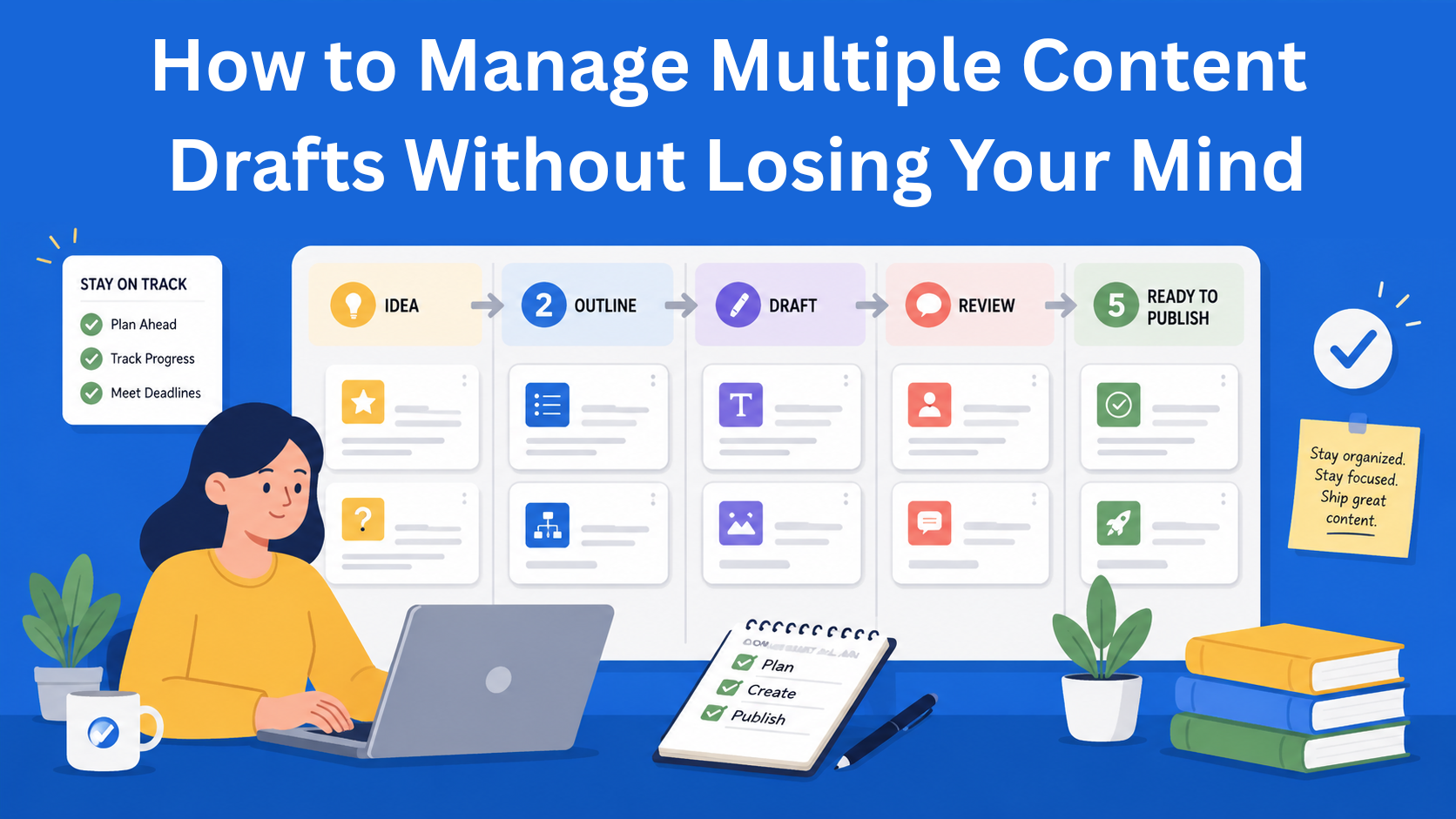
Five stages work well for most content creators:
- Idea - just a title or one sentence. Nothing more.
- Outline - the structure of the text, the main points, and maybe a few notes.
- Draft - you write, but you do not edit yet.
- Review - editing, SEO, and checking links.
- Ready to publish - everything is finished and waiting to be published.
Each piece of content should always belong to exactly one of these stages. Never two at the same time.
For the tool, you can use EasyContent, for example, where you can create your own workflow and define every step inside it, assign roles to team members and decide who is responsible for each step, communicate in real time inside the platform, customize a template for any type of content you are working on, and use many other options.
If your drafts are currently in several different places, move them into EasyContent and define a workflow for each one.
Name Files as If Someone Else Needs to Find Them
A file name may seem like a small thing, but it matters a lot when you have several drafts at the same time.
A good file name should immediately tell you what the topic is, what type of content it is, what stage it is in, and when it was last changed.
If you work in a team, agree on how you will name files. It is important that everyone uses the same naming style. That way, you will find the right file more easily and you will not waste time looking for the latest version.
Leave Notes for Yourself When You Stop Working on a Draft
This is a habit that makes a big difference, but very few people actually do it.
When you stop working on a draft, write a short note at the top of the document. Write where you stopped, what you need to do next, and whether there is anything currently blocking you.
Example:
I stopped at the section about deadlines. I need to add one short example of how a team can track how far they have come with a text. The next step is to finish that example and send the draft for review by Friday.
When you come back to that draft the next day or a week later, you will not waste time trying to remember where you were. You can continue right from the place where you stopped.
This is especially useful when you are working on several texts at the same time. You cannot keep everything in your head. That is why it is better to write all important information in the document, so you always know where you left off.
Plan the Writing Stages, Not Just the Publishing Date
Most content calendars look like this: topic, channel, publishing date. That is useful, but it is not enough.
If you only know the publishing date, that is not enough. You also need to know when the text has to be written, when it needs to be reviewed, and when it needs to be ready for publishing. Otherwise, it is easy to end up doing everything at the last minute.
A better approach is to plan backward from the publishing date. For example, if you are publishing a text on the 15th of the month:
- By the 13th - the text must be reviewed and the final version must be finished
- By the 11th - the draft must be complete
- By the 8th - the outline must be ready
- From the 1st - you start the research
This makes your content calendar more useful. You do not only see when something should be published, but also when each stage has to be finished. And if you use EasyContent, for example, you can add a due date for each step in the workflow. That way, every team member immediately knows when they need to finish their part.
When you write several texts, you can work in two ways.
The first way is to create plans for all texts on one day and write the actual texts on another day.
The second way is to finish one text completely and only then move on to the next one. Try both ways and see which one works better for you.
No matter how you work, review all your drafts once a week. Set aside 15 minutes, open your list of texts, and check how far you have come with each one. Look at what is finished, what still needs to be done, and where something is stuck.
Conclusion
The problem is not that you do not have enough discipline or motivation. The problem is that you do not have a clear system that helps you track every draft.
When every draft has its own stage, a good name, short notes, and a clear place in the calendar, it becomes much easier to track several texts at the same time. Then you do not have to keep remembering where you stopped and what you need to do next.
In that way, you will see more clearly what the priority is, what is still waiting, and which text is close to being finished. And when you have that kind of overview, it becomes much easier to create content.
EasyContent is built for agencies managing many clients at once
- Every client's content, templates, and calendar stay isolated in their own project
- White labeling, on Business, keeps your own agency's brand in front of every client
- Client approvals happen through a shareable link, with no seat required
- You pay for a content workflow platform sized for what an agency actually needs