How to Build an SEO Content Calendar That Drives Organic Traffic
Learn how to build an SEO content calendar that helps you plan topics, choose better keywords, publish consistently, and grow organic traffic from Google without relying only on paid ads.

Anyone who has a website or blog knows how hard it can be to bring visitors from Google search. You can write a dozen great articles, and the traffic can still stay in the same place. The reason is usually that you publish randomly, whenever you have time, without a real plan. That is where an SEO content calendar can help you.
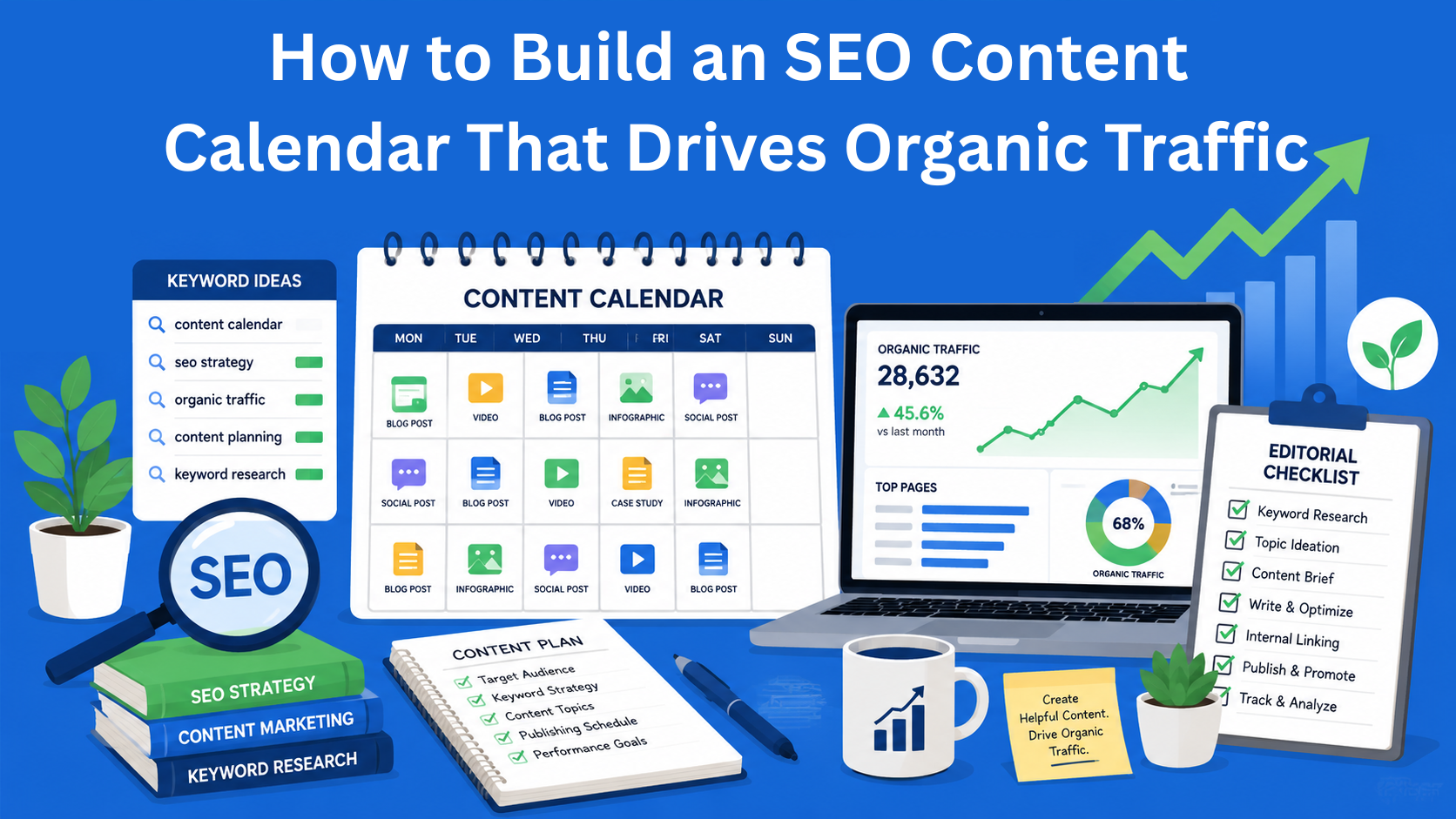
An SEO content calendar is a plan that shows you what you will write, when you will publish the article, and which keywords you will use. Instead of writing randomly, you know in advance what you are doing and you create content that people can find more easily on Google.
In this blog, we will explain what an SEO content calendar actually is and how to create one.
Key Takeaways
- An SEO content calendar turns random publishing into a structured plan - it helps you decide what to publish, when, and which keywords to target.
- Consistency and planning improve long-term organic traffic - regular publishing around focused topics helps Google understand your site better.
- Keyword research is the foundation of every calendar - choosing the right keywords ensures your content matches what people are searching for.
- Content pillars create stronger topical authority - grouping related articles around key topics improves rankings and site structure.
- Tracking results helps you improve your strategy over time - analyzing traffic and rankings allows you to adjust and optimize future content.
What is an SEO content calendar actually?
Imagine a regular calendar, but instead of birthdays and meetings, it contains your future blog posts. Each post has a clear publishing date, a main keyword, a list of related topics, and everything else needed to make that article good for Google.
A regular content calendar tells you what you need to publish and when. An SEO content calendar helps you also understand why people are searching for that topic, which words they use on Google, and how your website can become a trusted source for that area.
Why is this important? Because Google likes consistency and quality. When you have a good plan, your website slowly but surely grows in search results. People come to your website naturally, without paid ads.
Why do you need this kind of plan?
First, traffic becomes more stable. Instead of having one good month and then three bad ones, you get a more steady flow of visitors throughout the whole year.
Second, you save time and energy. When everything is written down in advance, you do not have to stress every week about what to write next.
Third, it is easier to choose keywords. You do not choose them randomly, but instead create several articles around the same topic. Those articles connect with each other and help Google better understand what your website is about.
Fourth, it is easier to measure results. You can see what works, what does not, and quickly adjust your plan.
The fifth reason is that you have less stress. You know in advance which articles you need to prepare, and you do not have to keep coming up with a new topic at the last minute.
How to create an SEO content calendar - step by step
Step 1: Decide what you want to achieve
Before you enter anything into a spreadsheet, sit down and write your goals. Do you want more visitors? Do you want people to buy your product or service? Do you want people to see you as an expert?
If you sell an online fitness course, your goal could be “bring 5,000 monthly visitors to the blog and turn 3% of them into buyers.” When you know your goal, it is easier to choose topics.
Step 2: Find good keywords
This is the most important part. A keyword is what people type into Google.
Use free tools such as Google Keyword Planner, AnswerThePublic, or Ubersuggest. Look for keywords that have:
- A good number of searches, but not too many
- Low or medium competition
- Clear intent, meaning people want to learn something, buy something, or solve a problem
Also write down questions such as “how to lose weight in one month,” “best tennis racket for beginners,” and similar examples. These are great keywords for beginners.
Step 3: Create your main content pillars
Choose 4 to 5 big topics that you will build your whole website around. For example, if your blog is about digital marketing:
- SEO
- Social media
- Email marketing
- Paid ads
- Analytics
Around each pillar, create smaller articles that connect back to the main topic.
Step 4: Decide how often you will publish
Be realistic and do not plan too many articles right away. It is better to publish two good articles per month than eight articles written in a hurry. For a start, it is enough to publish one to two articles per week, or a few articles per month.
Step 5: Create the calendar itself
The easiest way is to use Google Sheets or Notion. The table should have the following columns:
- Publishing date
- Article title
- Main keyword
- Secondary keywords
- Article length, meaning word count
- Content type, such as guide, list, review, and so on
- Status, such as idea, in progress, finished, published
- Person responsible
- Links to other articles on the website
- Expected traffic
Fill it out at least 3 months in advance.
Step 6: Think about SEO elements in advance
While creating the plan, immediately think about the things you will need for the article: the title, a short description for Google, images, and links to other articles on your website. That way, you will not have to do everything from scratch later.
Step 7: Plan promotion too
It is not enough to just write the article. You also need to share it where your audience can see it. That is why you should write in the calendar where you will publish or promote each article, for example on Instagram, in a Facebook group, through a newsletter, or on Pinterest.
Which tools can help you?
For a start, a simple Google Sheets file is more than enough, it is free and easy to use.
As you grow, you can try:
- EasyContent, which is great for teams and has a content calendar inside the platform
- Trello, which works like a board with cards
- Semrush or Ahrefs, which have built-in content calendars
You do not have to pay for tools right away. Start with what you already have.
The most common mistakes people make
- They create a plan that is too ambitious, start with 12 articles per month, and give up after two weeks.
- They choose only difficult keywords with very strong competition.
- They do not update the calendar when things change.
- They write articles without thinking about what people are really searching for.
- They forget to promote what they have written.
How to measure whether the calendar is working
After 2 to 3 months, check Google Analytics and Google Search Console:
- How many visitors come from organic search?
- Which articles bring the most traffic?
- Which keywords are starting to appear on the first page?
Based on that data, you can see what you need to change in your next plan. SEO does not bring results overnight. It is built slowly, through regular publishing and improving your content.
Conclusion
You do not have to create a perfect plan for the whole year right away. For a start, it is enough to plan the next 8 to 10 weeks. That is already a very good first step and it will help you get into a routine more easily.
Once you get used to working with a plan, it will be much easier to publish new articles regularly. Over time, more and more people will come to your website through Google, read your articles, and come back again.
An SEO content calendar is not complicated. It is a simple plan that helps you know what you are publishing, when you are publishing it, and why you are doing it. When you have that kind of plan, it is easier to stay consistent, and regular publishing is one of the most important things for better results.
EasyContent stays in the background so your agency stays in front
- White labeling swaps in your logo and colors across the platform
- Notification emails go out under your own company name
- Clients experience your brand end to end, from brief to publish
- Available on the Business plan alongside SSO