Why Spreadsheets Are Killing Your Content Workflow (and What to Do Instead)
Stuck in messy content workflows? Spreadsheets slow teams down, causing missed deadlines, burnout, and chaos. Discover why it's time to ditch sheets and upgrade to a purpose-built content platform that boosts clarity, collaboration, and output.

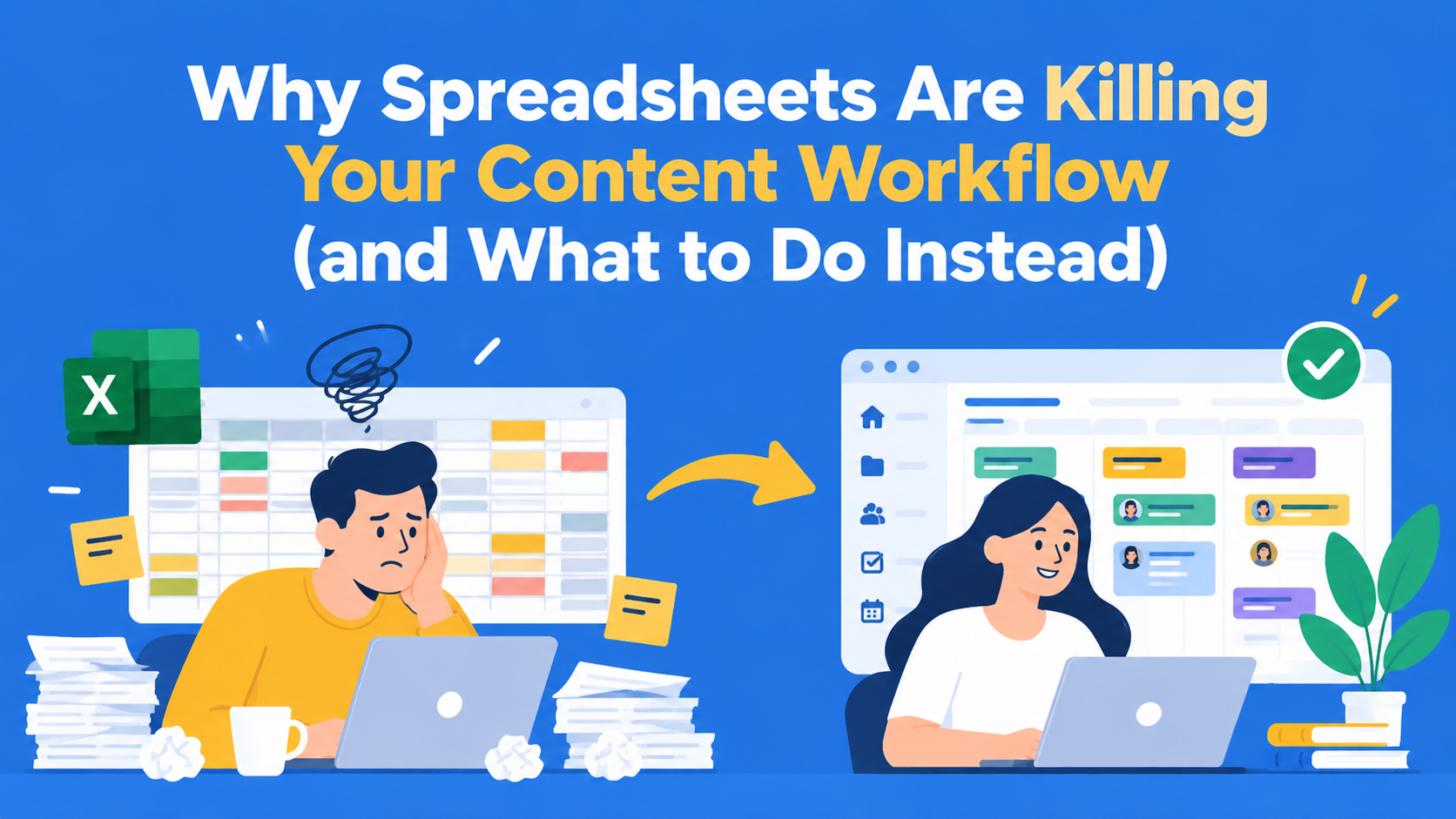
Spreadsheets can be useful for planning a few blog posts or tracking simple deadlines. However, when multiple writers, editors, and clients work on the same content, managing the entire process through spreadsheets becomes increasingly difficult.
Teams often have to switch between spreadsheets, documents, and emails just to check what has been completed, what is waiting for review, and who is responsible for the next step.
In this blog, we will explain when using spreadsheets for content management starts to create problems, how to recognise the first signs of those problems, and what a better-organised workflow could look like.
Key Takeaways
- Spreadsheets weren’t built for content workflows - they fall apart as your team scales.
- The “Sheet + Doc” system breaks down when you’re juggling multiple people, tools, and deadlines.
- Hidden costs of spreadsheets include lost time, poor visibility, missed deadlines, and team burnout.
- If you're managing 10+ pieces or 3+ stakeholders per asset, it’s time to upgrade your system.
- Purpose-built platforms like EasyContent centralize, streamline, and eliminate friction in your content workflow.
From “It Works for Now” to “Everything Is on Fire”
Spreadsheets are often the first tool teams use to manage content. A content manager creates a spreadsheet with article titles, assigned writers, deadlines, and statuses. Writers prepare the texts in separate documents, while editors and clients send comments by email.
This way of working can function well when the team is managing a smaller number of articles. However, as the number of people and the volume of content increase, it becomes harder and harder to keep the information up to date.
When spreadsheets stop being practical for content management
Imagine a marketing agency that works on 20 blog posts every month for several different clients and uses Google Sheets to track article titles, assigned writers, deadlines, and content status. Writers prepare the texts in Google Docs, while editors and clients send comments by email.
At first, this way of working seems simple enough.
However, as more and more articles go through the approval process, problems start to appear.
Here are a few common problems the agency faces:
The problem is not that the team uses spreadsheets. The problem arises when a spreadsheet becomes the main tool for managing a process that involves multiple people, content changes, and different approval steps.
The Real Cost of the Spreadsheet Strategy
Spreadsheets are often free or already part of the tools a company uses. However, managing content through spreadsheets can create extra work that is not immediately noticeable.
Content managers can spend hours updating statuses, checking document versions, and reminding team members to approve content.
How to calculate the hidden costs of managing content through spreadsheets
Imagine a content manager who spends part of every working day organising the work on their team’s articles.
Here is how much time some of those tasks can take:
Over four weeks, that adds up to 22 hours spent on administrative tasks.
If one hour of a content manager’s work costs the company $25, these tasks represent a cost of $550 per month.
These figures are fictional and serve only as an example for calculating costs.
The time spent organising the work is only part of the problem. When an editor overlooks a comment or a writer works on an outdated version of the text, the team may be forced to repeat work that has already been done.
A specialised content workflow platform will not eliminate all administrative tasks. However, when content, responsibilities, comments, and deadlines are all in one place, the need for unnecessary manual work can be reduced.
Before changing tools, teams should assess how much time they currently spend organising the content creation process and whether a different system would help them reduce that time.
Tracking the right content operations KPIs can help teams identify where they lose time and which improvements are worth prioritising.
How to Know You’ve Outgrown Spreadsheets
To assess whether your team needs a different way of working, ask yourself the following questions:
- Does someone have to manually update content statuses every day?
- Do writers and editors sometimes work on different versions of the same article?
- Are deadlines missed because it is unclear who is responsible for the next step?
- Are important comments getting lost among emails and documents?
- Does your content manager spend too much time checking progress and reminding team members to approve content?
If several of these problems keep recurring, it may be time to consider changing your current way of working.
The number of articles and people involved in the process also matters, but there is no universal threshold that applies to every team.
For example, a team that prepares five specialist articles per month that go through several review and approval steps may need a specialised workflow tool sooner than a team that creates twenty simple social media posts each month.
The most important question is not how many rows your spreadsheet has, but whether the current way of working still allows your team to get the job done efficiently.
What a Purpose-Built Content Platform Does Differently
A specialised content workflow platform enables teams to manage content, tasks, deadlines, and reviews in one place.
Instead of manually updating a spreadsheet every time something changes, teams can work on content items that have clearly defined responsibilities and approval steps.
Let’s look at how the marketing agency from the previous example could organise its work in EasyContent.
Example 1: Organising content and deadlines in one place
The agency works on 20 blog posts every month for several different clients.
Previously, the content manager used a spreadsheet to track progress, separate documents for reviewing articles, and emails to find comments.
In EasyContent, the agency can organise its articles within a project.
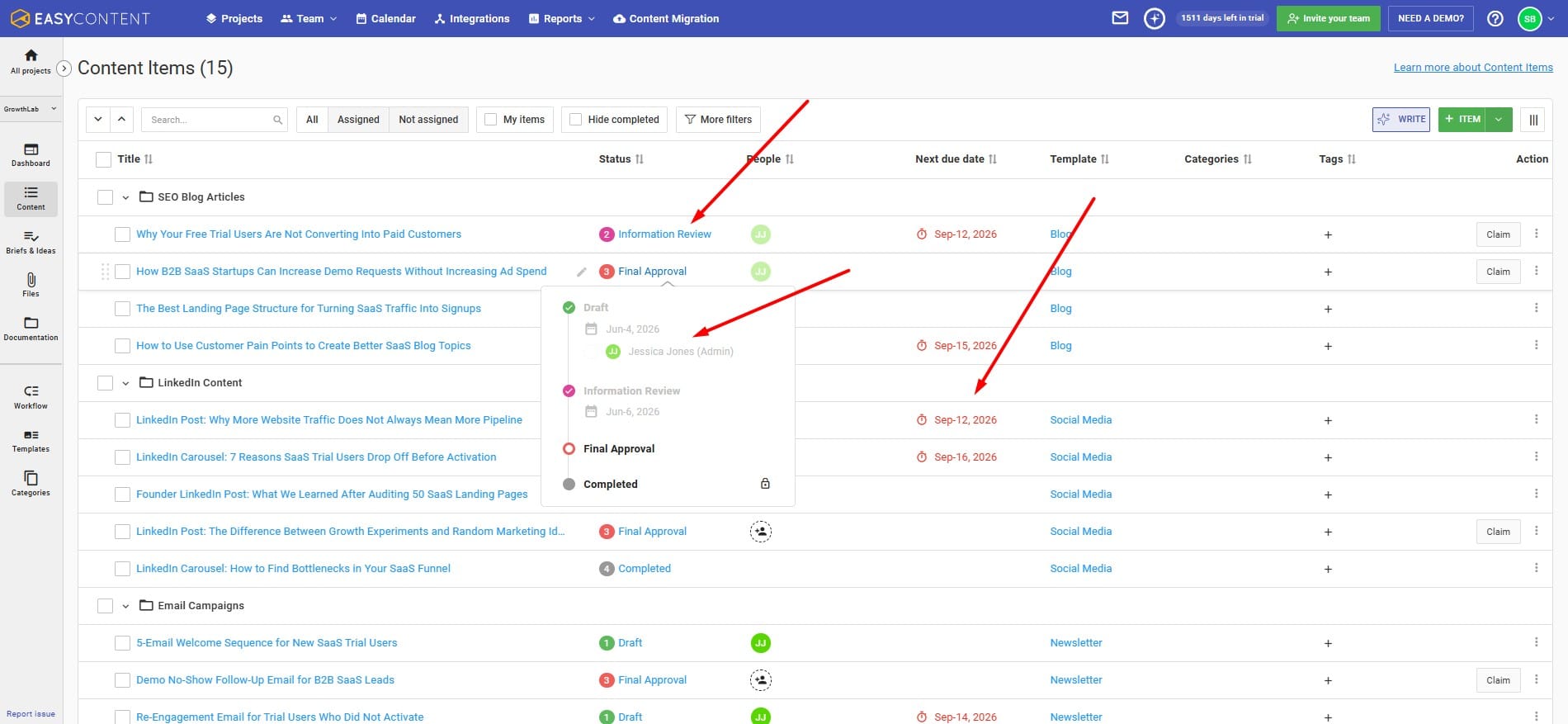
Each content item contains information about the responsible team members, the current workflow status, and the deadlines.
For example, the agency’s articles could be organised like this:
- Five articles in the Draft stage, assigned to writers.
- Four articles in the Editorial Review stage, waiting for the editor’s review.
- Three articles in the Client Review stage, waiting for the client’s comments.
- Eight articles that have already been completed.
These numbers serve only as an example, but they show how a content manager can track progress without having to maintain a separate spreadsheet.
EasyContent also offers a content calendar where teams can view assigned tasks, deadlines, and planned activities.
Example 2: Managing content approval through a clearly defined workflow
Now imagine the agency is preparing a blog post about accounting software for one of its clients.
Instead of requesting every approval by email, the team uses the following workflow:
Draft → Editorial Review → Client Review → Approved for Publishing → Completed
Each step has clearly defined responsibilities:
- Draft (Writing): The writer prepares the article.
- Editorial Review: The editor checks the content and requests changes when needed.
- Client Review: The account manager collects and organises the client’s comments.
- Approved for Publishing: The content manager confirms that the article is ready for publishing.
- Completed: The article has gone through all the steps of the content creation process.
In EasyContent, agencies can customise workflow steps, assign responsible roles, and set deadlines for each step.
For teams that need more guidance, this content approval workflow guide for agencies explains how to organise reviews and client feedback from the first draft to final approval.
Team members can see the current status of an article and easily determine who is next responsible for working on it.
An example of how a marketing team can organize its workflow.
Example 3: Keeping comments and changes in one place
During the editorial review, the editor notices the following sentence in the article about accounting software:
“Accounting software completely eliminates errors in bookkeeping.”
The editor highlights that sentence and leaves a comment:
“Can we phrase this more precisely? Software can reduce the number of errors that occur with manual work, but it cannot completely eliminate them.”
The writer then changes the sentence to:
“Accounting software can help reduce errors that occur with manual bookkeeping.”
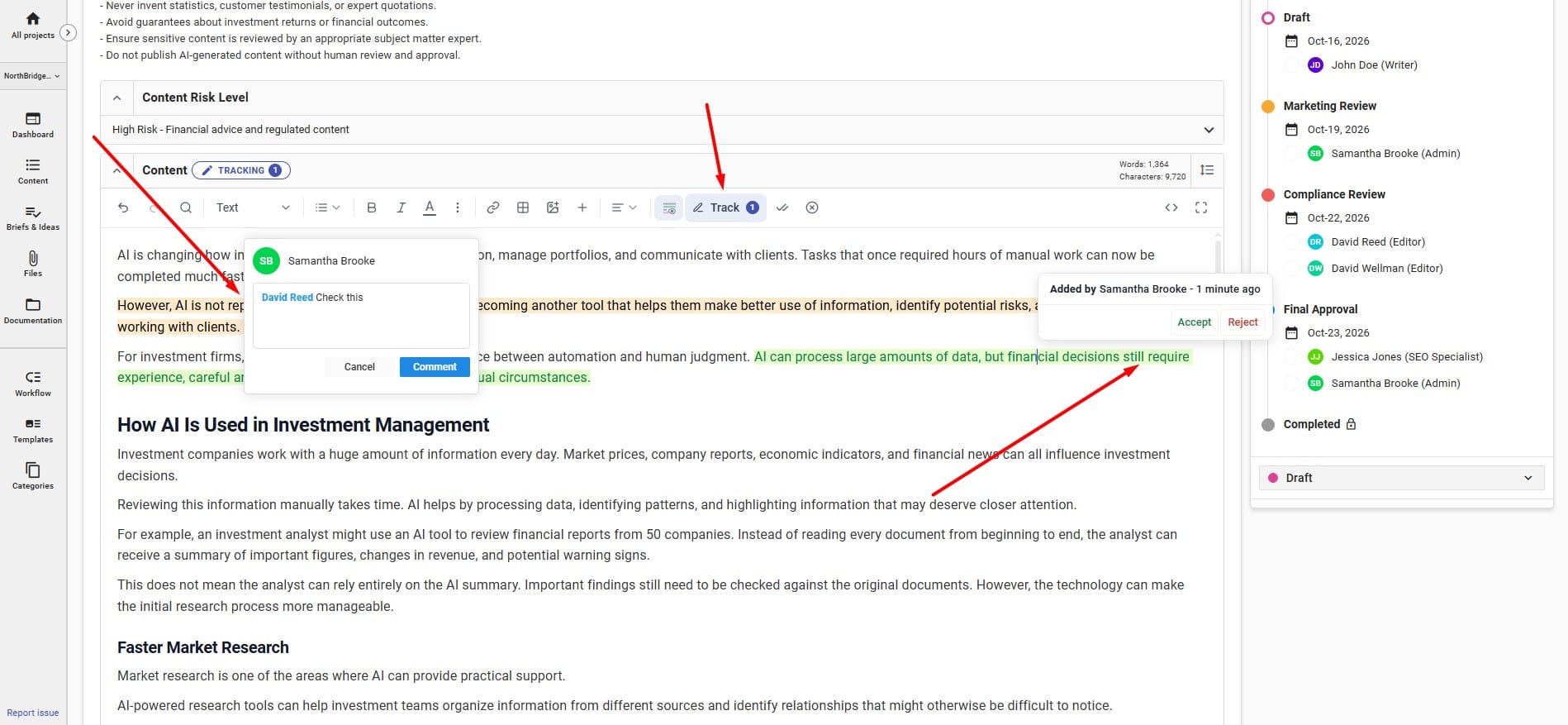
In EasyContent, people reviewing the content can leave comments directly on specific parts of the text and use the Change Tracking option to follow the changes that have been made.
Instead of sending new versions of the document by email, the writer and editor can work on the same content item.
This way, all comments remain linked to the article, and team members can more easily understand why a particular change was made.
All these features together help the agency manage content, reviews, and deadlines through one organised process, instead of using multiple disconnected tools.
How to Measure Content Workflow Efficiency
Stopping the use of spreadsheets does not automatically mean that your team will work faster.
To understand whether a new way of working brings improvements, you need to compare several important metrics before and after the change.
Useful metrics include:
- Time needed to create content: How long does it take for an article to go from the first draft to final approval?
- Number of revision rounds: How many times does an article need to be changed before it is approved?
- Waiting time for approval: How long does content wait for someone to review it?
- On-time content completion: What percentage of articles are finished within the planned deadline?
Example: Comparing workflow efficiency
After switching to a specialised content workflow platform, the marketing agency compares the results of its work during two similar one-month periods.
These figures are fictional and are intended only to demonstrate how workflow performance can be measured.
These figures are fictional and serve only as an example of how workflow efficiency can be measured.
The agency can use these metrics to determine which parts of the process have improved and which still need additional work.
For example, if content still waits too long for approval, the team may need to change the distribution of responsibilities or adjust the deadlines for content review.
The goal is not simply to stop using spreadsheets, but to create a workflow that enables the team to create, review, and approve content more efficiently.
“Free” Tools Often Cost More Than Paid Ones
When teams hesitate to switch, it’s usually because they’re trying to be budget-conscious. We get that. But there’s a difference between being cost-efficient and being stuck in a system that drains your resources.
A free tool that slows you down is more expensive than a paid one that makes you faster.
A free tool that creates confusion is more expensive than a paid one that brings clarity.
A free tool that burns out your team is more expensive than one that helps them thrive.
We tend to measure cost in dollars. But the true cost of a tool (especially for growing content teams) is measured in time, trust, and how well your people can do their jobs.
If your current process is no longer working, start by reviewing the biggest problems and testing a different approach with one project.
Once you're ready to make the change, our guide to migrating to a new content workflow tool explains how to plan the transition, move existing content, and prepare your team.
EasyContent is what several agencies replaced their old process with
- One team called their old workflow "a nightmare" before switching (Josh M, Duoplus)
- Another said email and Word docs for blog posts are now a thing of the past (Teresa R, JRCPA)
- A third called in-line edits a game changer for managing contract writers (Angela R, TeamBuilding)
- A fourth replaced a single shared Word document with a page-by-page review structure (Zizzo Group)