Slickplan Draws the Sitemap.
EasyContent Runs the Pages.

Slickplan is built to plan a website's structure. EasyContent is built for everything that happens next: routing each page to named approvers, tracking who changed what, and letting a client sign off without paying for a seat, all on top of a hierarchy that already looks like the site you're planning.

No credit card required
Special Offer for Slickplan Users
20% off for 12 months
All plans, for 12 months. Use code SLICKPLAN20 at checkout.
Easy onboarding
Bring your pages in from a CSV or TXT file with our built-in migration tool, on every plan. Map your fields once and import everything in one pass.
No commitment
Start with a 14-day free trial. Cancel anytime.
New customers only.
Where the job continues after the plan is drawn

A sitemap is the start of a website content project, not the whole of it. Once the structure exists, someone has to write 60 pages against it, route each one through the right reviewers, let a client approve without handing them a login, and keep a record of who changed what and when. That's the part of the job EasyContent is built for.

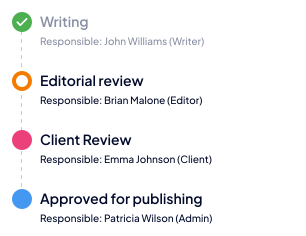
Approval routing with named reviewers
Configure a workflow with up to 20 steps and unlimited reviewers per step on the Business plan, assign specific roles to each status, and EasyContent auto-assigns the next reviewers the moment an item moves forward.
Guest sign-off, with a real approve button
Anyone with a shareable link can view content with no account at all. Registered guests can comment or, if you allow it, edit and formally approve an item, and none of it counts against your team size on any plan.
A sitemap-style hierarchy that runs your content
Content items and folders nest into a parent-child tree that mirrors your site structure, with drag-and-drop nesting and reordering. Every node in it is a real page with a workflow status, assignees and a due date attached.

With EasyContent You Can
set-up
set up approval workflows

Give every status a named reviewing role, require sign-off before a page moves forward, and let notifications, reminders and reporting handle the chasing.

writing
organize-content
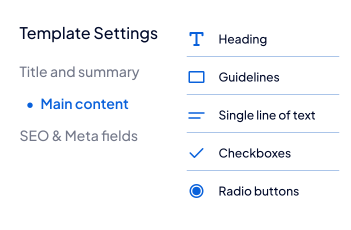
organize content with templates

Build each page type from typed fields, word and character limits and guidelines, so every writer starts from the same brief instead of a blank document.

template-settings
collaborate
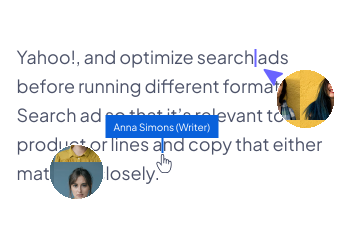
collaborate in real time

Two people can open the identical page at the same time, type in the same field, and watch each other's changes land live, on every plan.

collaborate
keep-track
see every edit, by author

Every addition and deletion is color-coded to the person who made it, with accept and reject controls per change or in bulk, plus a full version history behind it.

analytics
stars-ai
Generate AI content your team still controls

EasyAI Writer drafts against your templates and style guide; EasyAI Editor reviews for grammar, structure, brand voice and SEO. Every suggestion lands in a side-by-side diff a human has to approve, with permission control at the account, project and user level.

Generate AI
Feature comparison
Feature Slickplan EasyContent
Sitemap-style hierarchy Dedicated sitemap and diagram builder Drives the whole content operation
Approval workflow with role-gated sign-off per step Custom status labels, one of which can lock a page read-only. Role-gated sign-off not described in its documentation Up to 20 steps, unlimited reviewers per step (Business)
Change tracking with accept/reject controls Suggestive editing mode, individually or in bulk Per change or in bulk, color-coded by author
Guest review with a formal approve action Preview-mode sharing needs no account and supports optional commenting. An approve action for outside reviewers is not described in its documentation On every plan, with no seat consumed
Editorial calendar Month and week views with drag-and-drop rescheduling On every plan
Real-time co-editing of the same page Not as of August 2026, per our own hands-on testing of two people in the same page at once On every plan
Governed AI (permissioned, side-by-side review) AI tools on the Pro plan and above Account, project and user level control, full audit trail
WordPress integration Yes Bidirectional push and pull (Studio and above)
Figma integration Import guide Live plugin (Studio and above)
Content migration tool Not described in its documentation Built-in CSV and TXT importer, on every plan
Published pricing, no sales call required Yes Yes

Where this table says Slickplan’s documentation doesn’t describe something, that’s a statement about what we found in Slickplan’s own help articles as of August 2026, not a claim that Slickplan lacks it.

Bring Your Pages In From a CSV

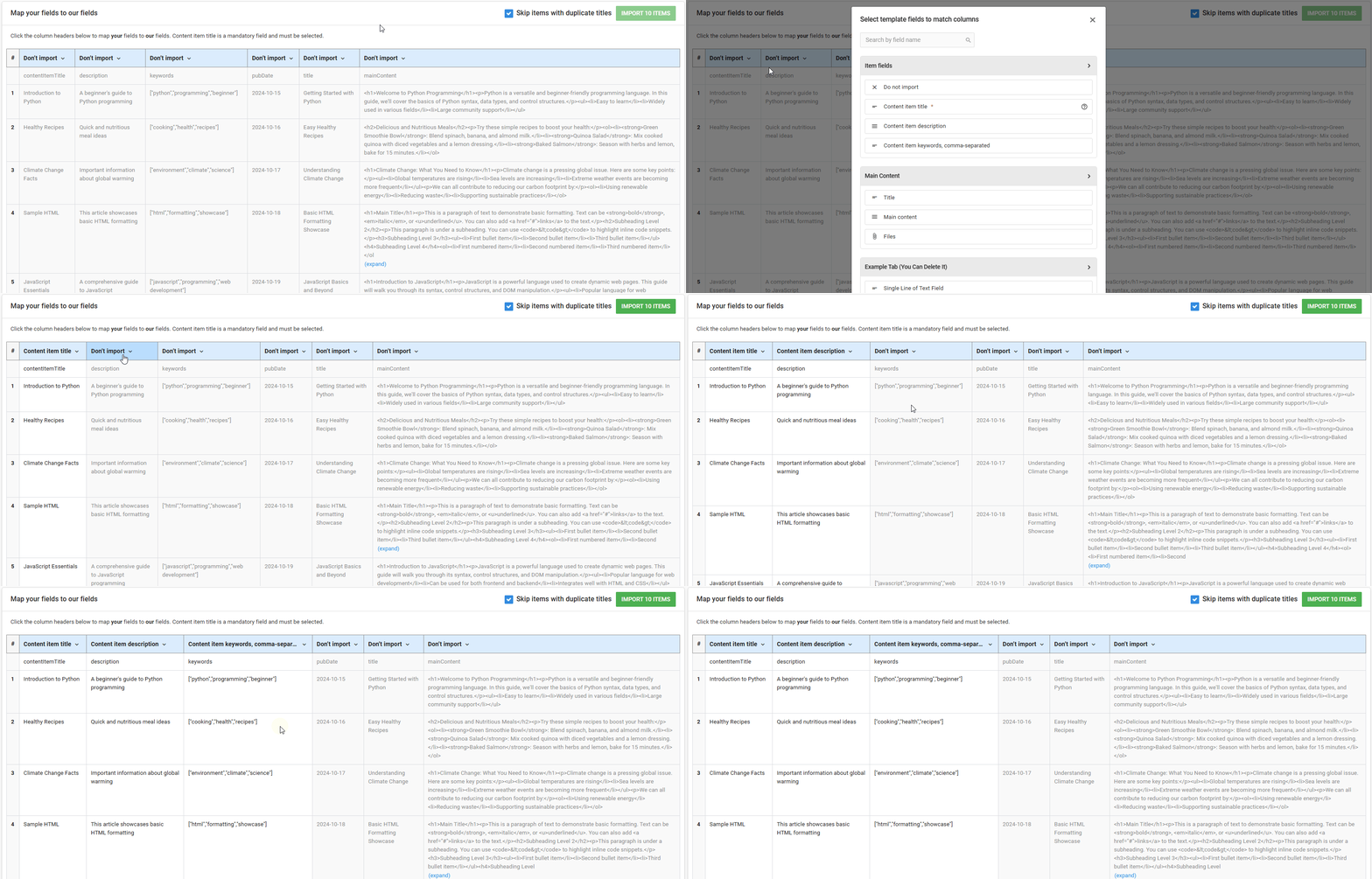
If your pages already exist somewhere else, EasyContent's content migration tool imports them from a CSV or TXT file, on every plan. Upload the export, then click each column header to map it to a field on your template: title, description, keywords, publish date, body, whatever your template defines. Items with duplicate titles are skipped by default, and anything you don't need stays set to "Don't import".

From there, nest the imported pages into your site's shape by dragging them into place, the same way you'd arrange them in a sitemap. Read the migration guide →

Mapping CSV columns to EasyContent template fields in the content migration tool
Mapping your columns to template fields during import, with a live preview of every item before it lands.
Frequently Asked Questions
Is EasyContent a good alternative to Slickplan?

Yes, if the job is running the content operation for a website: structured templates, approval routing, change tracking, guest sign-off and an AI layer your team controls. EasyContent picks up right where a sitemap or wireframe leaves off.

What's the actual difference between EasyContent and Slickplan?

Slickplan is a planning and diagramming tool built around four products: Sitemap Builder, Diagram Maker, Content Planner and Design Mockups. EasyContent is a content operations platform: writing, reviewing, approving and publishing the pages that sitemap describes, with a hierarchy that mirrors the site structure the whole time. Plenty of teams agree on structure in a sitemap tool, then move the writing and approval work into EasyContent.

Can two people edit the same page in Slickplan at the same time?

Slickplan's own help documentation describes real-time chat and asynchronous suggested edits. Based on our own hands-on testing as of August 2026, opening the same page as two users at once, it does not support two people typing in that same page at the same time and seeing each other's text merge live. EasyContent does, on every plan.

Does EasyContent have approval workflows a content review process needs?

Yes. Configure workflow statuses with named reviewing roles, assign specific approvers to each step, and require sign-off before an item moves forward. The Business plan supports up to 20 steps with unlimited reviewers per step.

Can a client review and approve content without an EasyContent account?

Yes, on every plan. Share a link that lets anyone view with no login, and let registered guest users comment, edit or approve depending on the access level you set, all without consuming a seat.

Can I migrate my content into EasyContent?

Yes. EasyContent's content migration tool, available on every plan, imports your content from a CSV or TXT file. Map your fields to a template and your pages come across in one pass, then nest them into your site's shape by dragging them into place. See our migration guide →

Does EasyContent integrate with WordPress?

Yes, on the Studio plan and above. The integration is bidirectional: push content from EasyContent to WordPress, or pull WordPress posts into EasyContent, with category mapping in both directions and support for Yoast SEO and All in One SEO.

How does the 20% off discount work?

Use code SLICKPLAN20 at checkout to get 20% off any plan for 12 months. Available to new EasyContent customers only, and stackable with the 14-day free trial.

Is there a free trial, and how much does EasyContent cost?

Yes, 14 days, no credit card required. Pricing is published in full, starting at $47 a month on annual billing, with no sales call required to see any of it.

Trusted by Hundreds of Teams
What teams building websites say...
quotes

Each Page Set Up Like the Sitemap

We love having each page set up like the sitemap and how it will be built in the web platform. The permissions and workflow make it so easy to stay on top of client approvals. We absolutely love the collaboration feature with notes and tags. I wouldn't use anything else.

Zizzo Group logo
quotes team-building

EasyContent Makes Managing Content Approvals Incredibly Easy

We had a website project with over 100 pages of content with an editing and approval process involving multiple people. Plus approvers varied between the different pages. Keeping track of everything was a nightmare until I found EasyContent. EasyContent made the process so easy! It gave us a single source of truth for the content and approval process and was just what we needed.

Josh M
team-building
Ready to run the pages, not just the plan?