
-
Features
-
Content Workflow
Streamline content creation with our automated approval workflow.
-
Real-time Collaboration
Collaborate effortlessly using our powerful text editor with comments and mentions.
-
Customizable Templates
Boost productivity with structured content templates tailored to your needs.
-
Rich-text Editor
Enhance your content using our versatile rich-text editor.
-
Publishing Calendar
Manage deadlines and schedules with our visual publishing calendar.
-
Digital Asset Library
Efficiently manage and incorporate multimedia assets to enrich your content.
-
Change Tracking
Monitor edits and revisions with ease, ensuring content accuracy and accountability.
-
Hierarchical Trees
Utilize parent-child relationships and folders to organize your content in hierarchical trees.
-
Easy AI
AI writing and editing, governed by your workflow and your rules.
-
Content Workflow
-
Industries
-
Marketing Agencies
Collaborate with team members and clients, collect approvals, and deliver high-quality content more efficiently
-
Enterprise
Coordinate across departments to generate content that drives ROI and brings value to your target audience
-
Government
Engage the public by sharing important news, progress, and processes on time
-
Healthcare
Produce educational, valuable, and engaging content that will set you apart from the competition
-
Higher Education
Manage your team, collaborate on content, and organize resources in one place
-
Financial Services
Generate valuable content faster by leveraging our platform which is built to help teams work together seamlessly
-
Non-Profit
All the tools your team needs to produce content that helps create awareness for your cause.
-
Marketing Agencies
-
Use Cases
-
Writing Team Management
Manage your writing team in one place — workflows, deadlines, approvals, and full visibility.
-
Content Approval Workflow
Build a structured approval process your clients and stakeholders can trust.
-
Content Operations
One platform for workflows, teams, templates, and approvals — built for scale.
-
Content Production
Run content production without the chaos — clear briefs, automated hand-offs, full visibility.
-
Editorial Workflow
Manage assignments, editing rounds, and approvals for articles and long-form content.
-
Content Planning
Strategize and schedule content with templates, workflow automation, and a visual calendar.
-
Content Gathering
Collect content from clients and contributors with structured forms and automated reminders.
-
Marketing Content
Centralize marketing content production and keep every campaign on brand and on schedule.
-
Website Content Planning
Plan and produce website content page by page, organized by your site structure.
-
Writing Team Management
- Pricing
- Login
Content workflow software in 2026: 23 tools compared
Choosing the right content workflow tools comes down to who has to approve the page. This guide profiles 12 apps in depth, covers another 11 in groups, and prices every one of them against the vendor's own published figures.
Content workflow software moves a page from draft to approved
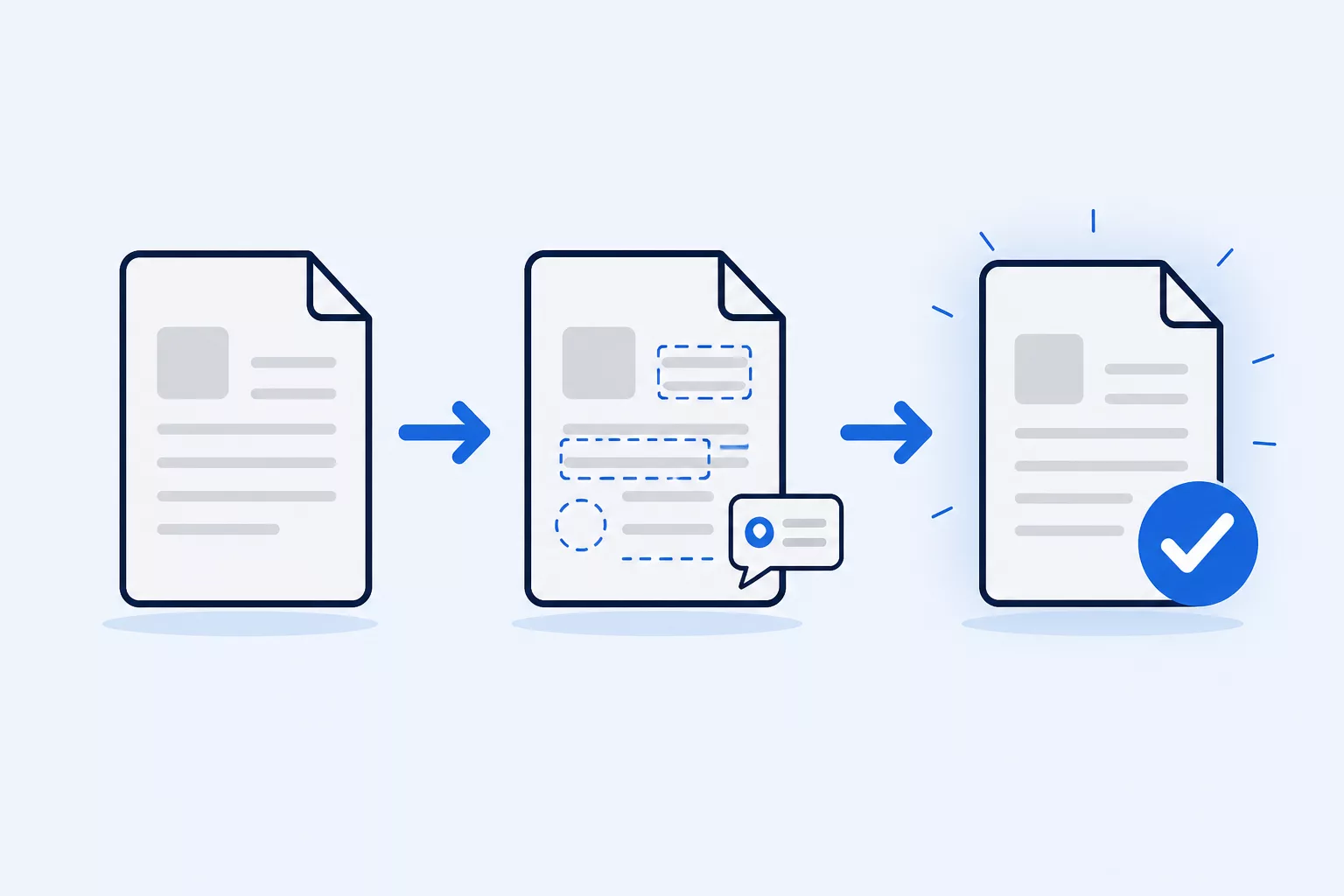
Search for content workflow software and you get lists that put a keyword research tool, an Instagram scheduler and a kanban board in the same table. Those are three different jobs, and none of them is the one most teams are actually trying to solve.
The job is this. A website needs 40 or 400 pages of copy. The copy does not exist yet. It has to be written to a structure, because a services page and a case study need different fields in different places. Several people have to see it before it ships, and some of them do not work at your company and will never log into your CMS. At the end of all that, the approved text has to arrive in the CMS without anyone pasting it in by hand.
These tools are built for that sequence. Content workflow software holds the page before the CMS does, gives it a structure, routes it through named approvers, and hands it over once everyone has signed off.
That is a different problem from task management, which tracks whether work happened without holding the work itself. It is a different problem from AI writing tools, which produce text and have no opinion about who approves it. It is a different problem from SEO tools, which tell you what to write about. All three are useful. None of them answers the question of who has to approve this page and what happens when they do.
The confusion costs money. Teams buy a project management tool, run content through it for six months, and discover the approval trail lives in comment threads and the copy lives in 40 attached documents. Then they buy the thing they needed in the first place.
This guide profiles 12 tools and covers another 11 in groups, with prices checked directly against each vendor's pricing page in August 2026 rather than copied from another list. It also covers what to evaluate on, why this category is so hard to shop for, and what happened to the products that used to lead it.
Here is how the main tools compare
Ranked by fit for structured website content moving through named approvers. Prices and features are each vendor's own published pages, fetched 5, 6 and 10 August 2026.
| Tool | Starting price | Approval workflow | Default assignee | External reviewers | Concurrent editing |
|---|---|---|---|---|---|
| 1 EasyContent | $59/mo, $47/mo billed annually. Unlimited team members from $167/mo | Configurable multi-step workflow on every plan, 5 to unlimited steps by plan. Rejecting requires a reason; approving can require a star rating | Every workflow status, on every plan | Unlimited guest reviewers on every plan, no seat consumed | Yes |
| 2 Bynder Content Workflow | No published price, custom package per customer | Workflow and approval is the product | Responsible person set once at workflow setup | - | In-line feedback and comments |
| 3 Slickplan | Free, then $10.79 to $103.49/mo billed annually. Agency tier has unlimited users | Status labels only. No role-gated sign-off documented | - | No account needed to view. No formal approve action documented | No, observed August 2026 |
| 4 Content Snare | $35/mo billed annually, $42 monthly | Distinct Approve and Reject buttons. A reason on reject is encouraged, not required | Defaults to whoever creates the request | Unlimited clients and recipients | - |
| 5 Filestage | Free, then $199/mo and $329/mo. Annual billing gives 2 months free | Approve, Request changes or Reject, configurable by an admin | - | Unlimited external reviewers on every tier including Free | Real-time file annotation |
| 6 Lytho | No published price, customized per organization | Approval status set with a thumbs up or thumbs down in its mobile app | - | Unlimited stakeholders and reviewers on all three tiers | - |
| 7 PublishPress | $129/year for the Business bundle | Custom post statuses, permissions and an editorial calendar | Defaults the post author | - | - |
| 8 StoryChief | €69/$81 per seat. Agency €79/$93 per client workspace with unlimited users | Accept or decline, with optional feedback | - | - | Comments and suggestions |
| 9 Planable | $33/workspace/mo, Pro $49, unlimited users on every tier | None or optional on Basic, required on Pro, multi-level chains on Enterprise | - | Unlimited users per workspace, not per seat | Comments and suggestions |
| 10 Optimizely CMP | No published price | Approve or Decline. A reason can be required, depending on setup | Default assignees, for missed routing rules | - | Yes |
| 11 Sitecore Content Hub | No published price | Approve or Reject. Rejecting an asset requires a reason | - | - | Yes |
| 12 Contentful | Free, then $300/mo. Free tier 10 users, next tier 20 | Not available on Free, unlimited on Enterprise | Documented for translation workflows | - | Presence indicators |
A dash means we found nothing published either way, not that the feature is missing. Where a vendor publishes something, the cell says what the vendor says.
Slickplan is the one exception. We tested it directly on 4 August 2026: as of that date, it does not support two people editing the same page at the same time. Its content editor works through inline comments and a suggestion mode, where changes are proposed, then approved or rejected.
Demand for these tools arrives with a redesign or a replatform
Almost nobody wakes up wanting new content workflow apps. That single fact explains most of what is strange about this category, including why the guides are so bad.
Teams arrive here because something happened. A website redesign kicked off and the copy for 200 pages has to be written, reviewed and loaded. A CMS migration means every page has to be rewritten to a new structure. An agency signed four clients in a quarter and the spreadsheet that worked for one client stopped working. A tool the team relied on got acquired, repriced, or switched off.
Three things follow from that, and they should shape how you shortlist.
The tool that fits a one-off project is different from the tool that fits a recurring one. If you are rebuilding one website this year and will not do it again for three years, almost anything will get you through, and the thing to optimize for is how fast you can start. If you build sites for clients and there is always another build starting, the calculation inverts. Setup cost gets spread across every project, and the things that feel like overhead in month one (templates, roles, a workflow that matches how your team actually reviews) are what make month 14 cheap.
You will also be evaluating under time pressure, on a deadline that already exists, with the content team already behind. That is a bad environment for a 6-week procurement process, and it is why free trials without a credit card matter more in this category than in most.
And whatever you pick, the trigger that brought you here will end. The redesign will ship. If the tool only earns its cost during a project, look hard at whether you can pause or downgrade between them, because plenty of teams here are seasonal and plenty of pricing models are not.
Fourteen questions decide which tool fits
Most comparison lists evaluate on feature counts and star ratings. These are the questions that separate the tools when a real team runs a real project through them.
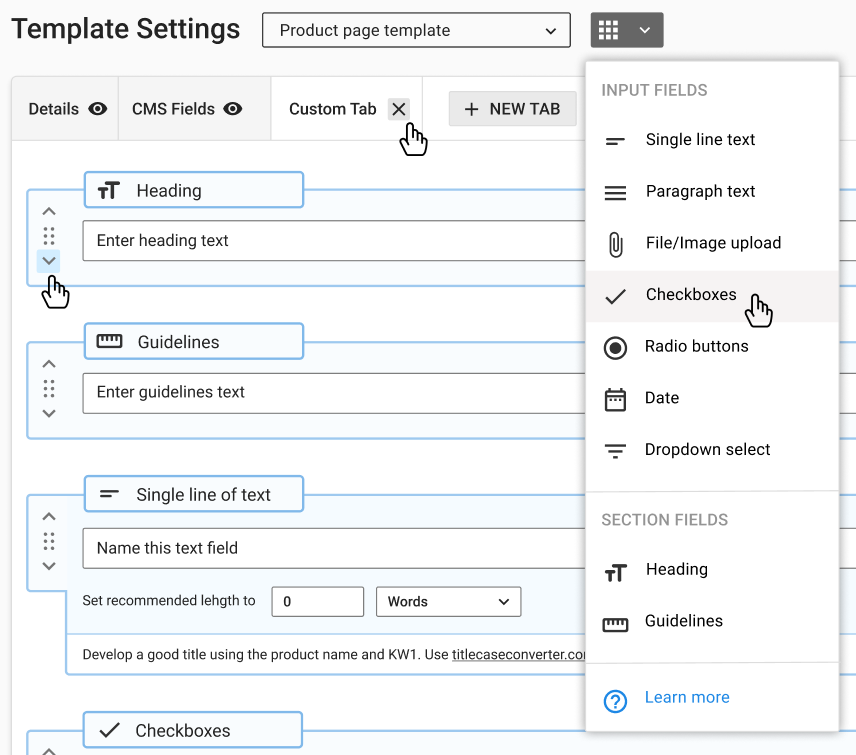
1. Can you build a template with typed fields, or is every page a blank document?
This is the most requested capability from teams making the switch, and it is the clearest line between content workflow software and everything else. A services page template with a hero headline field carrying a 60-character recommended length and a live counter, three benefit blocks and a required CTA tells a writer exactly what the page needs. A blank document does not. EasyContent has 10 general field types alongside its system fields, built in customizable content templates. Input fields carry optional guidelines and a required flag, and text fields add a recommended length with a live character and word counter.
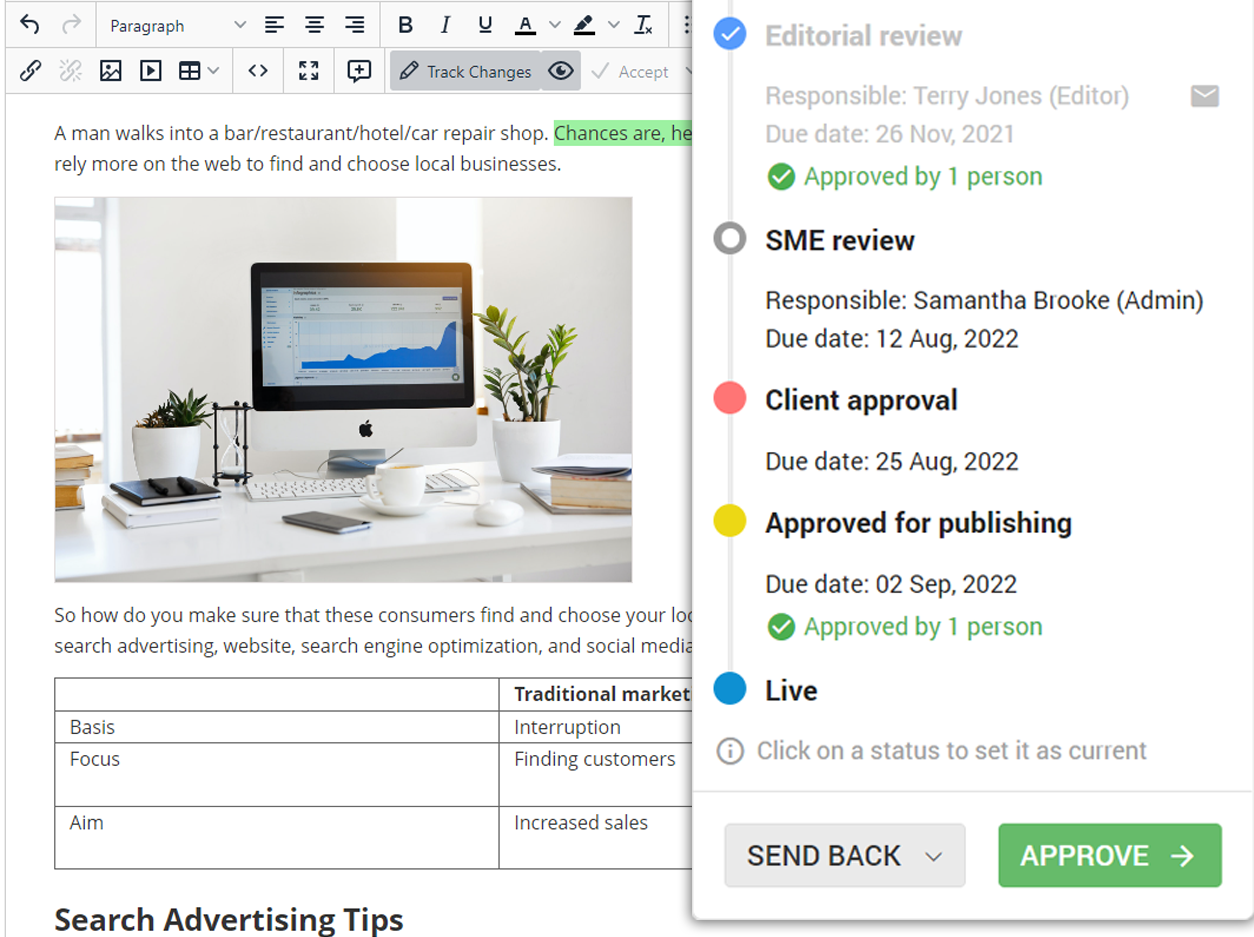
2. Can approval have more than one step, with a named person at each, and does the tool enforce what happens when someone says no?
"Approved" is not one event in most organizations. It is an editor, then a subject matter expert, then legal or a client. The question is whether the tool models that as a sequence with a named owner per stage. EasyContent's content workflow ships a default of draft, editorial review, approved for publishing, completed, and lets you rebuild it: color, name, which roles can be assigned, auto due dates, and a read-only setting that locks an item so nobody can edit it regardless of permissions. Plans cap the number of steps at 5, 8, 12, 20 and unlimited, with 1, 2, 3 and unlimited reviewers per step.
Every status can also carry a default assignee, so the right reviewer is already attached the moment an item is created or moves forward, with no extra setup beyond the workflow itself. Two other tools in this guide document something in the same direction, plus a partial third: Optimizely CMP, for requests that fall outside its routing rules, Wrike, gated to its Business, Pinnacle and Apex plans and skipped for anything created through an API, a form or an integration, and ClickUp, whose AI auto-assigns a task the moment it is created, though not later when the task moves between stages. Rejecting an item in EasyContent always requires a reason, and approving one can require a star rating. No other vendor in this guide publishes documentation combining both on the same step, as of August 2026.
 1:47
1:47
3. Can outside reviewers sign off without buying a seat?
Client-side approvers, subject matter experts and freelancers usually outnumber the licensed team. If each one costs a seat, the price of the tool scales with the size of your approval committee. EasyContent's shareable links give unlimited guest reviewers on every plan without consuming a seat, at view, comment or edit level, with an optional sign-off button. Seven other vendors in this guide publish some form of uncharged external reviewer, so this is a real dividing line rather than a unique feature.
One detail to get right when you test this: in EasyContent a guest sign-off marks the item as reviewed by that person and shows their name, and it does not by itself advance the workflow status. When the item does move on, guest sign-offs reset so they can review the new version.
4. Does the content structure match the site you are building?
A website is a tree. Most content tools give you a flat list or a board. If you are producing a sitemap's worth of pages, a parent and child content hierarchy that mirrors the site is the difference between a system you can navigate in month three and one you cannot. EasyContent nests items and folders by drag and drop into a sitemap-style tree. Zizzo Group, in a published case study, put it this way: "We love having each page set up like the sitemap and how it will be built in the web platform."
5. Can two people work on the same page at the same time?
Nine vendors covered here publish some form of live co-editing, including Google Workspace, so the capability itself is common. The question worth asking is what surrounds it. EasyContent has live collaborative editing, structured templates, multi-step approval with named approvers per stage, and guest reviewers who sign off without a seat, in one place. A shared document gives you the first of those.
Worth knowing when you test the alternatives: ClickUp's own documentation states that if people save simultaneously, the latest save takes priority and other edits may be lost.
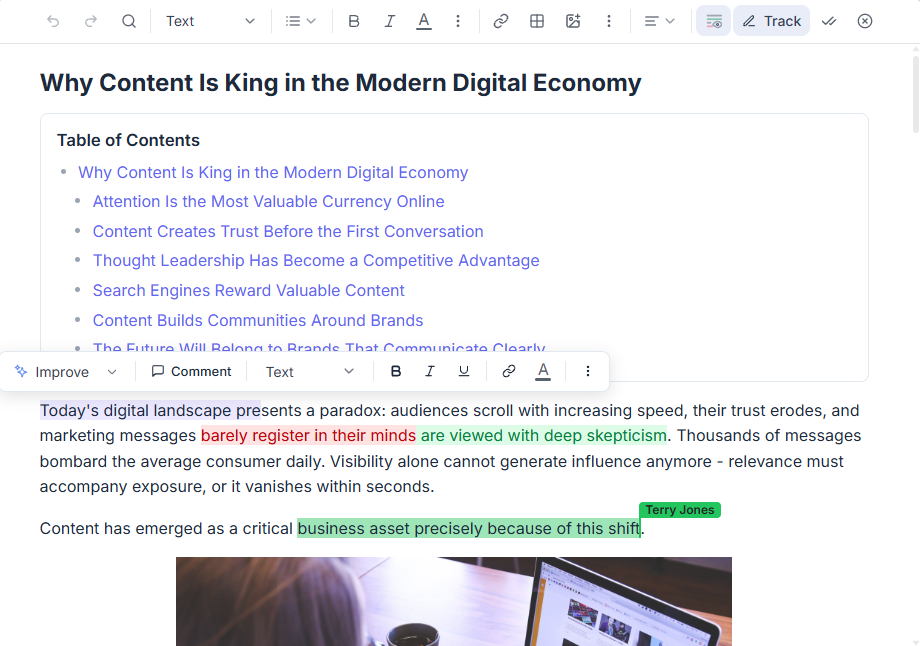
6. Can you see what changed, and go back?
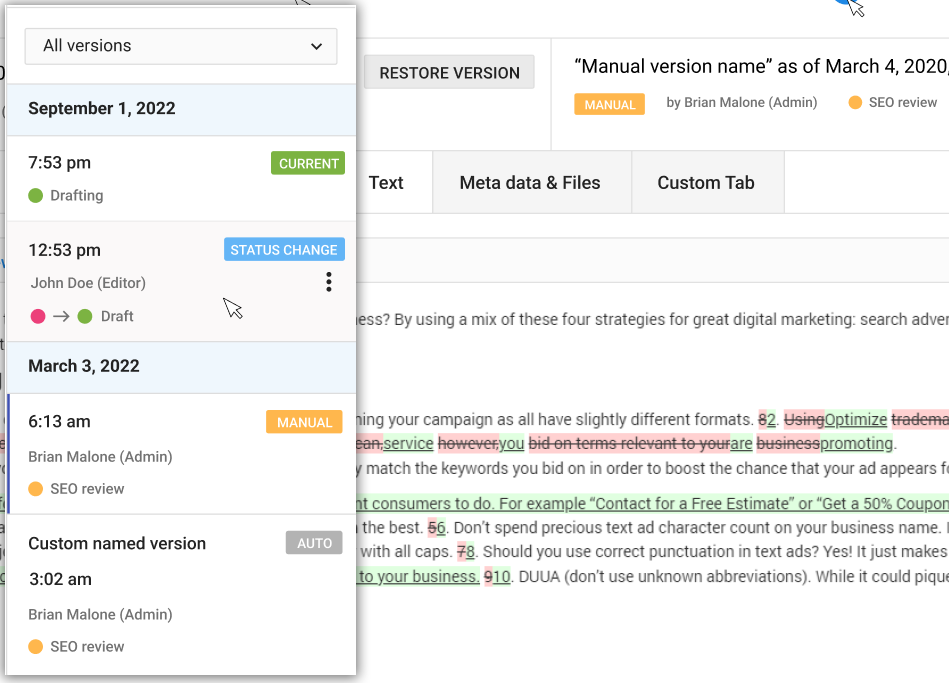
Track changes and version comparison solve the "which file is final" problem that spreadsheets and email attachments create. EasyContent has change tracking and version history on every plan.
7. Does it connect to your CMS, and specifically to WordPress?
CMS integration is the buying criterion we hear named most often, and WordPress is named more often than any other. EasyContent's WordPress integration is bidirectional and works with both the classic editor and Gutenberg, mapping categories in both directions and pushing featured images, excerpts, tags and slugs. Three constraints to know before you buy on this: it starts at the Studio plan, custom-structure items cannot sync, and meta title and description need either Yoast SEO or All-in-One SEO Pack installed, with exactly one of them active.
8. Does it connect to your design tool?
Design teams build page structure in Figma and the copy gets written into it, which makes the Figma link a workflow question rather than a nice extra. It comes up unprompted in sales conversations. EasyContent's Figma plugin is free to install and connects a Figma file to a project from the Studio plan up. You pick a template and an item, then drag content fields onto text layers, so a designer lays out the real headline and the real body copy instead of placeholder text. It handles single-line text, multi-line text, rich text and images, updates as the content changes, and lets you swap one item for another to see whether a layout survives copy that is twice as long.
9. If it has AI, who controls it?
Most of the tools here now ship some kind of AI writing feature, and several tie it to a brand voice profile the way EasyContent does. StoryChief's William AI generates a brand voice and applies it automatically. Optimizely CMP's Skills enforce brand voice guidelines and approved templates together. Sitecore Content Hub maps a brand kit to structured fields. Sanity's AI Context documents do the same against its schema. Brand-aware AI text is not a reason to pick one tool over another here.
What separates them is what happens after the AI writes something. EasyAI Writer drafts to an existing template and applies the project's style guide. EasyAI Editor suggests changes across grammar, structure, brand voice, SEO and conciseness, and flags claims worth checking. Every suggestion is reviewed side by side with the original before it lands, every AI change is recorded in version history and is reversible, so there is an audit trail of what the AI touched and who approved it, and AI can be switched on or off at the account level, restricted to specific projects, or limited to named team members. Monthly credits run 3,000 to 25,000 by plan and refresh each month. Two of the better-known AI writing tools, Jasper and Writer, work inside the EasyContent editor as browser extensions.
10. Does the pricing model match the shape of your team?
Per-seat pricing works against the workflow this category is built for, because approval committees are large and most of the people in them touch the tool twice a month. Per-workspace and unlimited-user models suit agencies with many light users. EasyContent charges per plan with unlimited team members from the Team tier at $209 monthly or $167 billed annually, so headcount does not change the bill. Planable and StoryChief both price per workspace with unlimited users. Asana, ClickUp, Notion, Trello and Airtable all price per user.
11. Is the price published at all?
Every vendor here that was acquired into a larger suite now routes you to a form instead of a price, which means a sales cycle, a quote, and a number you cannot benchmark against what anyone else pays. Covered below under how this category has consolidated.
12. What does it cost to get your content in, and out?
Import is the question everyone asks in a demo, and the CSV traps that silently drop a column are the ones that hurt. Export is the question that matters three years later, when a vendor is acquired. Both are covered below under migration.
13. Can you see where everything is without asking?
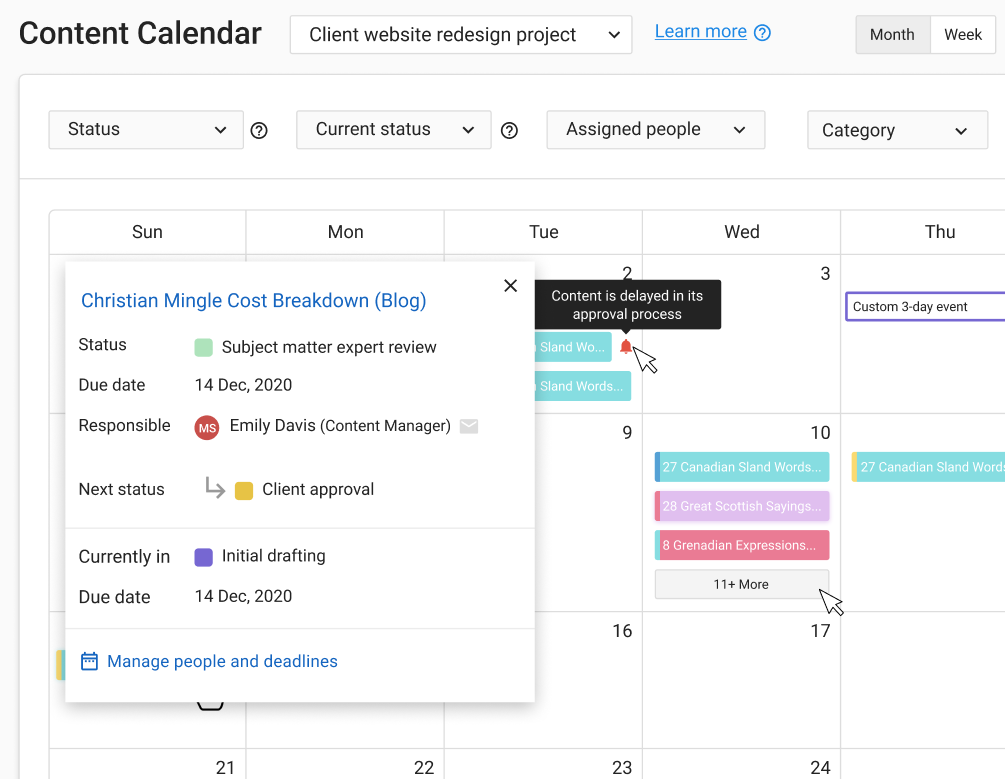
A status view across 200 pages is what the calendar and the reports are for. EasyContent's editorial calendar and content items view are on every plan. The reports are gated: the conversations report is Team and above, and the content status report is Business and above, and it refreshes once a day at 6 PM EST rather than live.
14. Who owns the vendor?
Six companies in this category have been acquired since 2019 and one of those products shut down in June 2026, so the ownership question is a risk question with a public answer. Ask who owns the company, when they bought it, and what has shipped since. Two of the six products in that record are no longer separately buyable, which is the outcome you are insuring against.
The tools divide into five classes
Start from the symptom rather than the category name. Most teams know what is broken and do not know what to call the software that fixes it.

| What you would say out loud | The class you need |
|---|---|
| "We are rebuilding the site and the copy is in 40 documents" | Content operations |
| "We need artwork and campaigns through brand and legal" | Creative operations |
| "The problem is only sign-off, the writing is fine" | Review and approval |
| "We run this in a shared doc and a spreadsheet" | Work management |
| "We already own Contentful, why do we need this" | Your CMS |
Content operations tools are built for this exact job
Gather structured content, route it through approval, hand it to a CMS.
EasyContent. Starter $59 monthly or $47 billed annually, Studio $129/$103, Team $209/$167, Business $499/$399, Enterprise custom. 14-day trial, no credit card. Full pricing is published.
Content lives in a sitemap-style tree of items and folders that mirrors the website being built. Each item is built from a template with typed fields: 10 general field types (8 inputs plus heading and guideline blocks) alongside system fields for title, main content, files, featured image, excerpt, tags, slug, meta title and meta description. Input fields carry optional guidelines and a required flag, and text fields add a recommended length with a live counter. Approval is a configurable sequence of statuses, with the roles that can be assigned to each, default assignees, auto due dates, and a read-only lock. Reviewers can score items against star ratings on any intermediate status, which are required once defined. Rejections require a reason and let the reviewer choose which earlier stage to send the item back to.
External reviewers work through shareable links at view, comment or edit level, with an optional sign-off button, and they never consume a seat on any plan. Team members are unlimited from the Team tier up.
Comments attach to an item, a field, a stretch of selected text, an attached file, or a precise point inside an image, with mentions and threading, on every plan. That last one, a comment pinned to an exact spot inside an image, is not something we found documented anywhere else in this guide. Change tracking, version history, in-app messaging, the editorial calendar, the asset library, the migration tool, briefs and EasyAI are also on every plan. WordPress, Figma, Zapier, the API and webhooks start at Studio. White labeling is a Business tier line item. SSO is Enterprise only.
Where it fits: agencies building client websites, and in-house teams who own a large site with contributors scattered across departments. Where it fits less well: a solo writer publishing a blog post a week, who does not have an approval problem to solve.
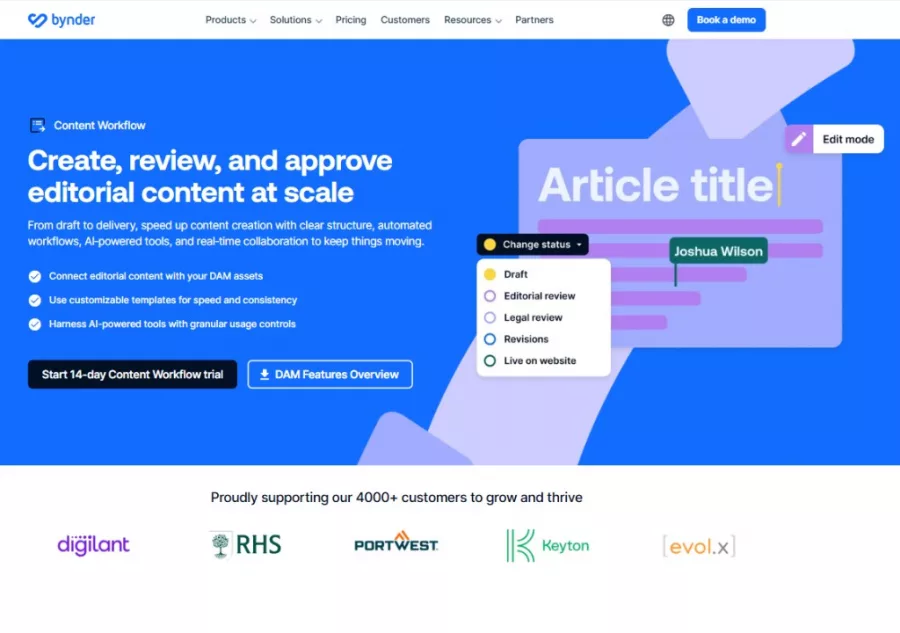
Bynder Content Workflow. No published pricing; Bynder states that every customer gets a custom package. This is the product formerly sold as GatherContent, which Bynder acquired in March 2022 and renamed in November 2023. It is the origin of this category and still the most likely incumbent you are replacing, which is why we keep a dedicated GatherContent alternative page. Bynder describes collaboration on it as in-line feedback, in-line comments and visibility on every change. It sits inside a much larger digital asset management suite, which is the reason to choose it and the reason to think twice: you get the DAM whether the content problem needed one or not.
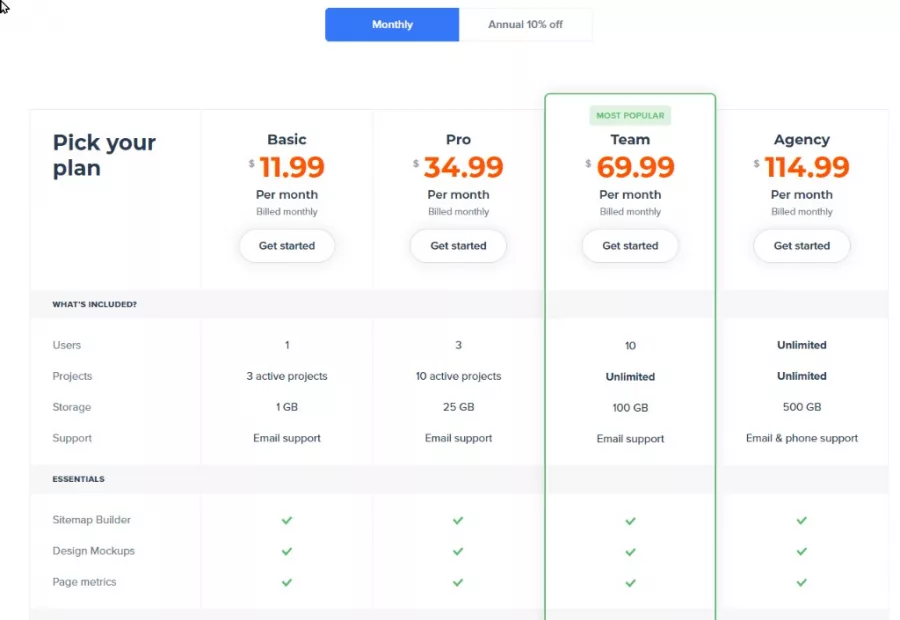
Slickplan. Free tier, then Basic $10.79, Pro $31.49, Team $62.99 and Agency $103.49, all monthly when billed annually, with unlimited users on the Agency tier. Slickplan is the only vendor here that combines a sitemap builder with a content planner. You draw the site tree, then write into it. The free tier covers one user and one sitemap, and the content planner itself starts at Pro. As noted above, two people cannot edit the same page text at the same time, observed August 2026, and collaboration in its content editor is inline comments and a propose-then-approve suggestion mode.
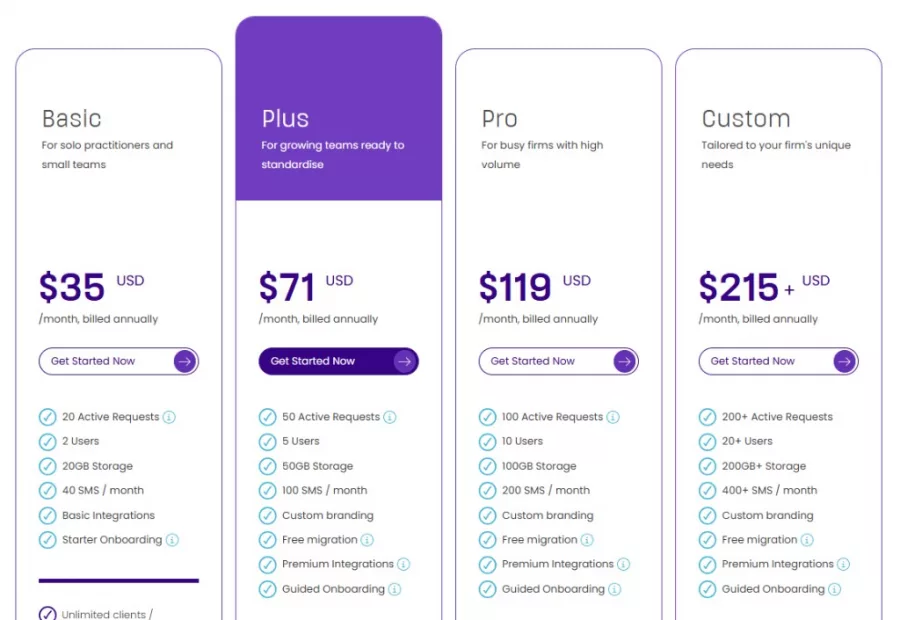
Content Snare. Basic $35, Plus $71, Pro $119 and custom from $215, all billed annually; monthly runs $42, $85, $143 and $258. Clients and recipients are unlimited. Content Snare owns the collection half of the problem: structured request forms, automated reminder chasing, and a clear view of who still owes you what. It is built for the case where the hard part is getting content out of clients in the first place, and it stops at the point where the content has to move through internal review.
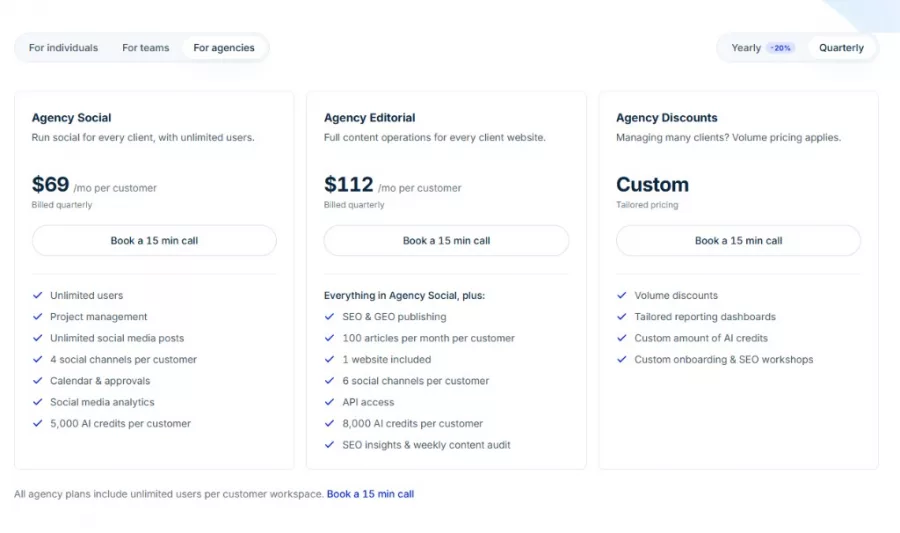
StoryChief. Team Editorial at €69 or $81 per seat. The Agency Editorial tier is €79 or $93 per customer workspace with unlimited users, which is the shape agencies want. Team Editorial is capped at 100 articles a month, 1 website and 6 channels, so check those numbers against your volume before you compare the per-seat price to anything. Collaboration is described as comments, suggestions and approvals living in the document. Strongest for teams whose output is articles distributed across several channels rather than pages in a sitemap.
Creative operations tools put the asset at the center
The campaign and the artwork drive the model here, and the page is one output among several.
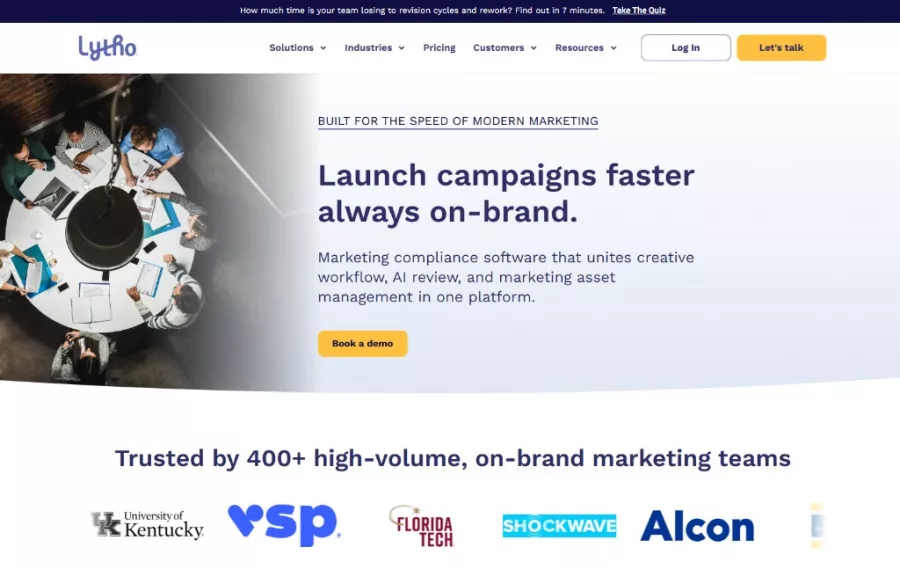
Lytho. No published dollar figure; Lytho states pricing is customized to each organization, and publishes unlimited stakeholders and reviewers across all three tiers. This is where DivvyHQ went after the February 2024 acquisition, and divvyhq.com/pricing now redirects to lytho.com/planner, a page that does not mention DivvyHQ. If you are working through that move, we cover it on our DivvyHQ alternative page. Lytho's center of gravity is creative operations: proofing artwork, managing brand assets and resourcing a creative team. If your approval problem is mostly design files, look here before you look at a content tool.
Optimizely CMP. No published price; Optimizely states every plan is individually packaged. Formerly Welcome, formerly NewsCred, acquired December 2021. Optimizely publishes that one or more contributors can edit the same document simultaneously, with avatars showing who is entering content. This is an enterprise purchase with an enterprise sales cycle, and the strongest reason to make it is that you already run other Optimizely products and want the content layer to come from the same vendor and the same contract.

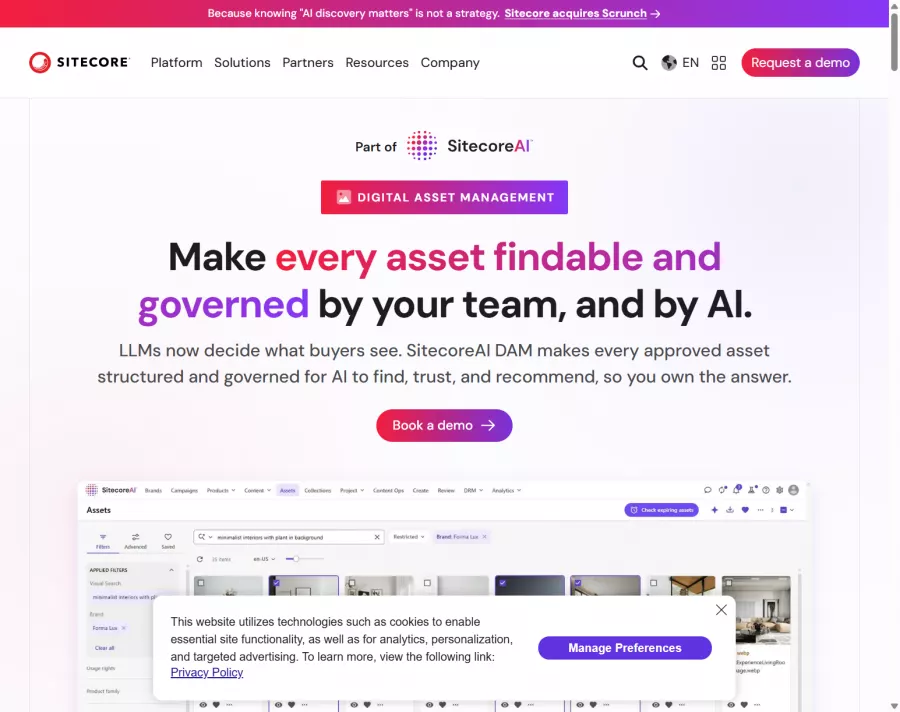
Sitecore Content Hub. No published price. Sitecore publishes simultaneous editing with edits visible in real time and colored pins showing who is where in the document. The buying logic is the same as Optimizely's and the trigger is different: Content Hub makes sense when Sitecore is already your CMS and the organization has decided to consolidate vendors. If Sitecore is not already in the building, the size of the platform is hard to justify for a content approval problem on its own.
Review and approval tools solve the sign-off half
Built for annotated feedback on something that already exists, from people outside your team.
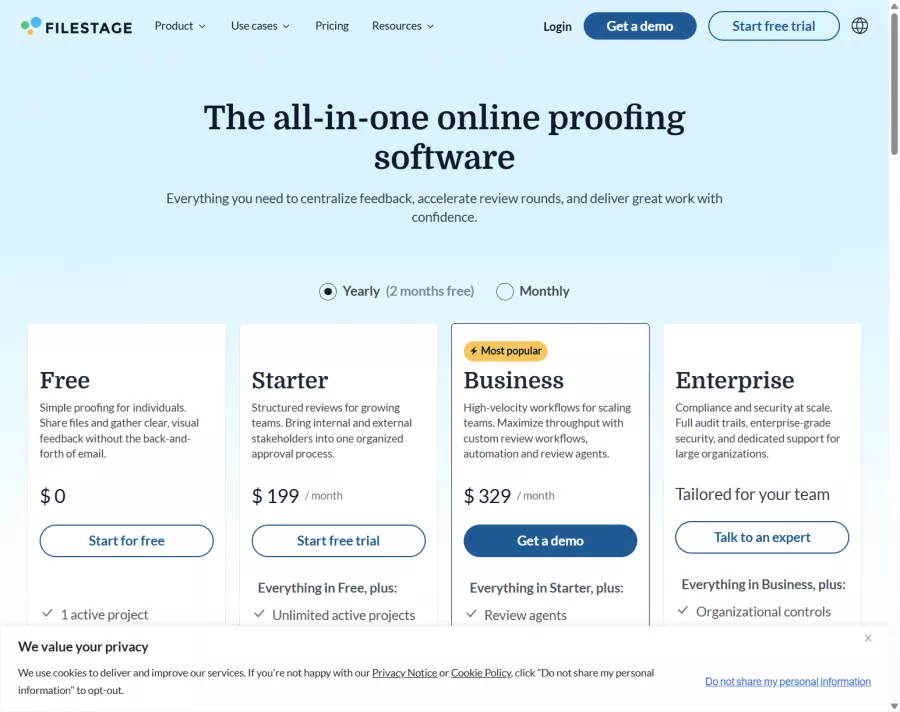
Filestage. Free tier, then Starter at $199 a month and Business at $329 a month, with 2 months free on annual billing. External reviewers are unlimited on every tier including the free one. Filestage does real-time annotation on files, including PDFs, video and design work. If your review problem is a finished artifact that needs marking up, this is the specialist.
Planable. Basic $33 and Pro $49 per workspace per month, with unlimited users on every tier. Approval is configurable as none or optional on Basic and required on Pro, with multi-level approval chains reserved for Enterprise, which is worth checking if your sign-off has three stages. Collaboration is internal comments, annotations and text suggestions. Planable's roots are in social media content, which is what its approval model is built around, and that fits posts better than a 2,000-word page with 12 fields.

Work management tools are the incumbent in most deals
This is what you are almost certainly using now. It is already paid for, everyone already has a login, and it works until the approver count rises.
The pricing is where the comparison gets interesting, because approvals are usually a tier upgrade rather than a feature. Asana starts at $10.99 per user per month billed annually, and Approvals live on the Advanced tier at $24.99 per user per month annually. For a team of 10 that is $2,999 a year, and the multiplication is the point: substitute your own headcount and compare it to a flat plan price before you decide the tool you already own is the cheap option. Asana does include unlimited free guests on every plan. ClickUp is $7 per user per month annually on Unlimited, with unlimited proofing on Business at $12, and guest seats capped at 5 on Unlimited and 10 on Business plus an allowance per paid member. Wrike is $10 per user per month on Team and $25 on Business, and its help center puts basic approvals on Team and above with full proofing and approvals on Business.
The rest are cheaper, and the thing to check on each is how it treats the people outside your team, because that is where the cost of a board-shaped tool actually shows up. Trello is $5 per user per month annually and free for up to 10 collaborators per workspace, though on Enterprise a guest working across multiple boards is billed at the member rate. monday.com runs $9, $12 and $19 per seat annually with a 10-seat minimum on its calculator, so the entry price is really $90. Notion is $8 per seat per month annually or $10 monthly, with unlimited guests from Plus and version history at 7, 30 and 90 days by tier and unlimited above that, which matters if your review cycle runs longer than a month. Airtable is $20 per user per month annually on Team and charges nothing for read-only collaborators, which works when your reviewers only need to look. Google Workspace is $7, $14 and $22 per user per month, and is what most teams are comparing against whether or not they say so.
In all eight the unit of record is a task, a row or a document, and the structure of the page is something you have to model yourself. Whether that matters depends on how much structure your pages need and how many people sign off, which is the next section.
Your CMS may already do some of this
"Our CMS has workflows" is true at some tier in most of them. What varies is which tier, and how much you can configure.
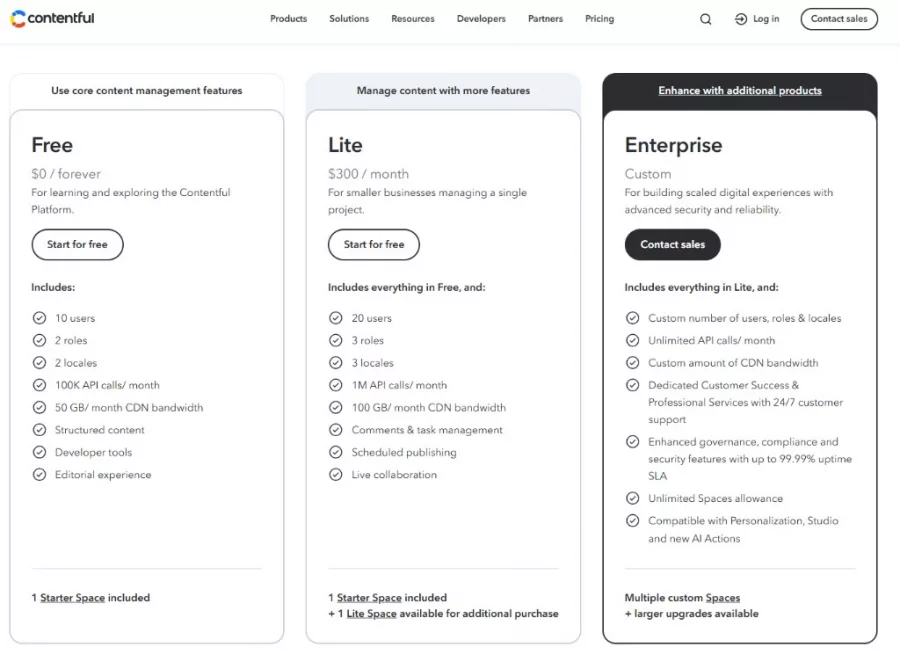
Contentful is free, then $300 a month, with workflows unavailable on the free tier and unlimited on Enterprise, and 10 users on Free and 20 on the next tier. It publishes presence indicators, and its management API rejects mismatched versions with a 409 conflict rather than merging them, which is an optimistic-locking model.
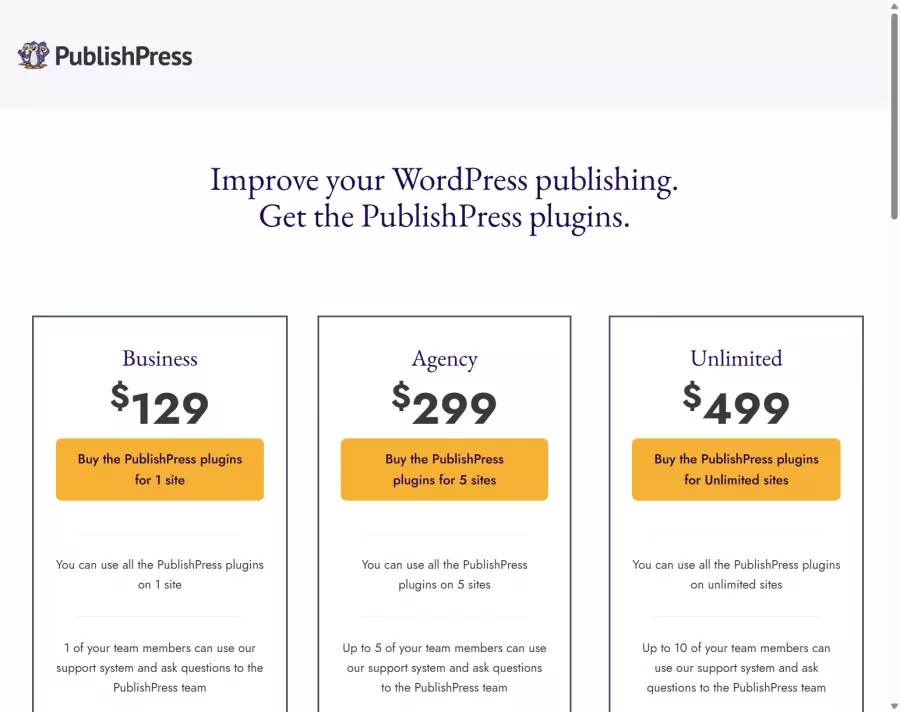
PublishPress is the WordPress-native answer: $129 a year for the Business bundle, $299 for Agency covering 5 sites, and $499 for unlimited. It adds custom post statuses, editorial permissions and an editorial calendar to WordPress through eleven bundled plugins, and it is an annual license rather than a monthly subscription, which suits teams who want to buy once. Work out how you want outside reviewers handled before you commit to it. On concurrent editing, PublishPress has written on its own blog that collaborative editing is "an incredibly difficult technical challenge" and framed it as something WordPress core would need to provide, which is a comment about the platform.
Three more worth knowing. Storyblok runs $90.75 a month annually on Growth, which includes 5 seats with extra seats at $15 each up to a hard ceiling of 10, and that ceiling is the thing to check first if your team is larger. Custom workflows are gated to the top tiers, at 2 on Premium and unlimited on Elite, so read the workflow row of the pricing table against the tier you are actually buying. Storyblok publishes real-time collaboration and also sells a content locking app from the Growth plan that locks a story as soon as the first user starts editing, which is a useful signal that co-editing and controlled editing are different things teams want. Sanity is free, then $15 per seat per month on Growth, which is where task management begins, so the free tier is for developers evaluating the CMS rather than for a team trying to run a review cycle in it. Kontent.ai publishes no price at all, and its approach to concurrent work is a third option worth knowing about: several people work the same content item at once in different fields, with each field locked while somebody is in it, which the vendor markets as collision protection. It answers a different worry from live co-editing: two people overwriting each other rather than two people needing to be in the page together. Kontent.ai's own documentation is direct about assignment too: whenever an item's workflow step changes, someone has to assign a contributor by hand.
The case for using your CMS is real when the content already exists in it and the approvers all have logins. It weakens fast when the content does not exist yet, which is the situation a redesign creates, and when half your approvers are clients you are never going to give CMS accounts to.
This category has consolidated into a handful of suites
Six acquisitions since 2019, and they explain more about your shortlist than any feature table.
| Product | Acquired by | When | Where it is now |
|---|---|---|---|
| Kapost | Upland Software | May 2019, $50 million | Sold as Upland Kapost, no published pricing |
| Percolate | Seismic | November 2019 | Folded into Seismic |
| NewsCred / Welcome | Optimizely | December 2021 | Sold as Optimizely CMP |
| GatherContent | Bynder | March 2022 | Renamed Content Workflow by Bynder in November 2023 |
| DivvyHQ | Lytho | announced February 2024 | divvyhq.com/pricing redirects to lytho.com/planner |
| Narrato | Typeface | September 2024 | Shut down 15 June 2026 |
GatherContent had 1,100 customers when Bynder bought it, and the announcement named Intel, the NHS, Volkswagen, Vanguard and VMLY&R. Bynder itself has been majority-owned by Thomas H. Lee Partners since December 2022, described at the time as a business with $100 million in annual recurring revenue, more than 600 employees and nearly 4,000 organizations as customers. Typeface had raised $165 million at a $1 billion valuation about a year before it bought Narrato, and shut Narrato down 21 months later. When Lytho announced the DivvyHQ acquisition, it said DivvyHQ would continue as a standalone product for the foreseeable future.
Every vendor in this category that was acquired into a larger suite has stopped publishing its prices, and it takes about 10 minutes to check. Bynder, Lytho, Optimizely, Sitecore and Upland all route you to a form.
What that looks like for the three names people still search: GatherContent pricing, DivvyHQ pricing and Narrato pricing.
Custom pricing is how enterprise software is sold, and it has good reasons behind it. What it means practically is a quote-based relationship with a sales team, renewal negotiations, and a price you cannot benchmark against what anyone else pays. If you are a 30-person agency, that is a different purchase from a published $167 a month.
The second practical point is durability. One product on that list shut down outright, in June 2026, and another was folded into its acquirer's suite. Teams who had built integrations against the one that shut down had to rebuild them. When you evaluate a tool here, the ownership question is a real risk question, and the answer is public before you sign anything.
Migration is the question to ask before you commit
Ask about getting in and getting out, in that order, and ask before you sign.
Getting in is usually a CSV. EasyContent's migration tool is on every plan: pick a project and a template, upload a CSV or TXT file, set the delimiter and enclosure, map your columns to template fields, and run it with a live log.
The traps are worth knowing because they are silent, and they are the same traps in most tools of this kind. Date fields have to be formatted yyyy-mm-dd or the field is dropped, and Excel will quietly reformat dates to your system locale even when the underlying file is correct. Checkbox, radio and dropdown values only import where they match an option that already exists in the target template, and unmatched values are discarded rather than flagged. A field mapped to a radio button that contains 2 values causes the whole field to be skipped. "Skip items with duplicate titles" is on by default and checks the title only, so two genuinely different pages sharing a name will lose one of them.
The fix is a 20-row test file before you run 2,000 rows, and a template built specifically for imported content. The imports that hurt are the ones that succeed and silently drop a column.
Getting out matters more than most buyers think during evaluation, and the acquisition record above is the argument. Ask three questions of any vendor. Can you export all of your content, in a format that is useful, without asking support? What happens to your data if you cancel, and how long is it kept? Is the export a feature of your plan or a favor?
EasyContent has content exports on every plan. Whatever you are evaluating, get the answer in writing before the trial ends, because it is the cheapest insurance available in a category with 6 acquisitions since 2019.
Project management software tracks whether work happened. Content workflow software holds the work itself. In a project management tool, a page is a card with a document attached to it and an approval recorded in a comment. In a content workflow tool, the page is the record: the fields, the copy, the version history and the sign-offs are all the same object, and "approved" is a status the system holds against a named person.
In several tools, yes, and it is worth checking exactly how each one charges for it. EasyContent gives unlimited guest reviewers on every plan through shareable links, at view, comment or edit level, without consuming a seat. Filestage offers unlimited external reviewers on every tier including its free one. Content Snare has unlimited clients and recipients. Lytho publishes unlimited stakeholders and reviewers across all three tiers. Asana includes unlimited free guests on every plan. Trello is free up to 10 collaborators per workspace, and on Enterprise a guest spanning multiple boards is billed at the member rate.
Plan a day for a few hundred items, most of it spent on the export and the field mapping rather than the import itself. The work is deciding which fields in the old system map to which fields in the new one, and cleaning up anything that does not fit. Run a small test file first, and check the imported result field by field rather than trusting the success count.
The 14 questions above, in short: structured templates with typed fields, multi-step approval with a named owner per stage, external reviewers who do not cost a seat, a hierarchy that matches your site, live co-editing, version history, CMS integration, design tool integration, AI you can control, pricing that matches your team shape, published pricing, import and export, status reporting, and who owns the vendor.
Not always. If your content is short, your approvers number 1 or 2, and everyone has a login, adding another tool costs more than it returns. The case gets strong when approvals involve people outside your company, when pages have structure that a blank document cannot describe, or when you are producing a site's worth of pages at once and need to see the state of all of them.
Usually because approval is undefined. When there is no named owner for each stage, work sits waiting for someone who does not know they have it. When feedback arrives by email, chat and comments at once, someone has to reconcile it by hand before anything can move. And when there is no record of who signed off, teams re-review work that was already approved. Defining the sequence fixes more of this than adding people to it.
Most of the recoverable time in a content team goes on coordination: chasing contributors, reconciling versions, and finding out where things are. Templates cut the round trip where a writer delivers something the page cannot use. A defined approval sequence cuts the waiting. AI drafting helps at the start of a page and moves the work to review, which is why the review step is the one to design first.
Published prices in this category run from free tiers to roughly $500 a month at the top of the published tiers, with most dedicated tools between $35 and $200 a month. Per-seat tools look cheaper until you count the approvers: a team of 10 on a $24.99 per user per month tier is $2,999 a year. The vendors that were acquired into larger suites publish no prices at all and quote per customer. EasyContent runs $47 to $399 a month billed annually, with unlimited team members from the $167 tier.
The approval step is where to start
Whatever you shortlist, run one real page through it end to end before you decide: a page with a template, 3 approvers, one of them outside your company, and a CMS on the other side. Most tools look similar in a demo and stop looking similar at the second approval step.
EasyContent gives you 14 days to do exactly that, with no credit card required.
See how real content teams use EasyContent to scale production, tighten approvals, and hit their growth goals.

Milwaukee engagement marketing agency that replaced messy Word-doc reviews with EasyContent, organizing website content page by page for faster, cleaner client approvals.
Read case study
Grew to 2M+ monthly visitors, ranked #15 on the Inc 5000. 600+ pieces of content managed through EasyContent.
Read case studyManage all your operations in one platform

Real-time Collaboration
Collaborate effortlessly using our powerful text editor with comments and mentions.

Content Calendar
Manage deadlines and schedules with our visual publishing calendar.

Customizable Templates
Boost productivity with structured content templates tailored to your needs.

Rich-text Editor
Enhance your content using our versatile rich-text editor.

Content Workflow
Streamline content creation with our automated approval workflow.

Asset Library
Efficiently manage and incorporate multimedia assets to enrich your content.

Easy AI
Transform your ideas into structured content with Easy AI.

Change Tracking
Monitor edits and revisions with ease, ensuring content accuracy and accountability.

Hierarchical Trees
Utilize parent-child relationships and folders to organize your content in hierarchical trees.
- We'll get back to you within 24 hours.
- We'll answer your questions and understand your business challenge.
- We'll schedule a personalized demo tailored to your specific needs.
- We'll help you set up and configure your account.